AI UX Designer Agents: Adopt Them With Control
What an AI UX designer agent can take on, where people must stay in charge, and how enterprise teams review, log and ship agent-made design changes safely.
 Axiom Studio November 26, 2026 14 min read
On this page
An AI UX designer agent is a system that takes a design goal, acts on design tools or code, checks the result and iterates. It does not just return a variant when you prompt it. That autonomy is the value and the risk. Its output ends up in your product as flows, components and pull requests, so the teams that benefit most are the ones that set approval rules, keep an audit trail and review every change before merge. This guide covers what these agents do well, where they fall short, and how to introduce one without losing control, including how VibeFlow keeps agent-made changes reviewed and logged.
TL;DR
- An agent pursues a goal through connected steps (act, observe, revise). A design tool or assistant handles one request at a time.
- Agents are strongest on structured, specification-like work such as prototypes, flows and audits. They are weakest on interpreting users’ emotions and weighing design tradeoffs.
- Delegate by stage and by risk, and keep a named human approver. Treat agent output like a junior designer’s first draft.
- Enterprise risks are data leakage, over-broad permissions, missing audit trails and new transparency rules, such as those in the EU AI Act.
- Once agent output becomes code, review it in the pull request, with findings and a logged record attached.
What an AI UX designer agent is
The term is used loosely, so a working definition of agentic AI in UX design helps. The Agentic Design Report from Postdigitalist separates agentic production from generative assistance: an agent receives a goal, acts on design tools or code, observes what happened and goes again. A generative assistant only produces options.
Academic work draws the same line. A 2025 OZCHI study of ten professional designers describes agentic AI as autonomous systems that pursue complex goals with minimal human intervention, unlike prompt-driven tools that respond only to direct input.
In practice, you can place three things on a ladder:
| Type | What it does | Example in UX work |
|---|---|---|
| Tool | One operation per request | Resize a set of assets |
| Assistant | Suggests or generates on request | Draft interview questions |
| Agent | Carries out connected steps toward an outcome | Map a flow, generate a prototype, audit it, revise it |
The difference from a human UX designer is judgment. Nielsen Norman Group tested AI prototyping tools in real design contexts and found they can follow instructions toward a general goal. They still missed visual hierarchy, grouping, color contrast and margin spacing even with detailed prompts, and they could not weigh design tradeoffs the way a designer who must justify each decision can.
Which UX tasks an agent can take on
You get the most from an agent when you match it to the stage of work, not to the job title.
Research. Figma’s documentation for its research agent lists summarizing interview notes, grouping feedback into themes, auditing designs for heuristic and accessibility issues, and drafting research questions. It positions the agent as a collaborator, with people interpreting the findings.
Requirements and concepts. An empirical study of generative AI across interaction design found it supported personas, scenarios, conceptual refinement and experiment design. All generated outcomes still needed manual quality assessment.
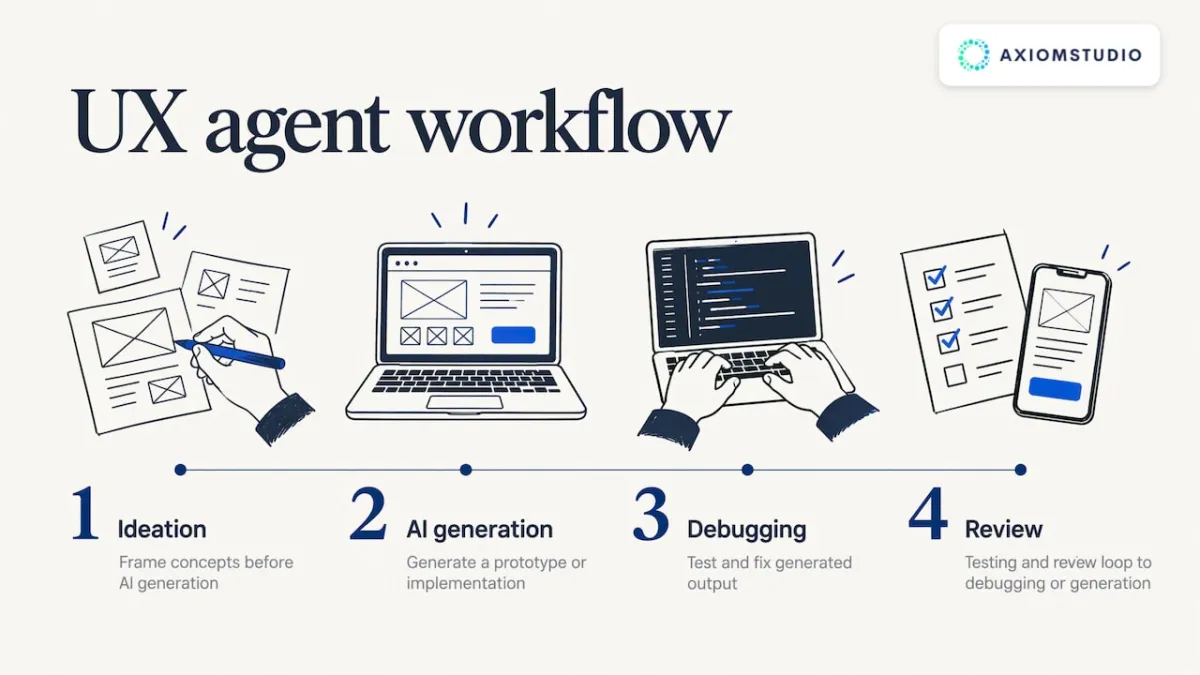
Prototyping and implementation. A study of 20 UX professionals using AI coding agents found a four-stage workflow of ideation, AI generation, debugging and review. Testing and review often loop back to debugging or generation, so plan for iteration, not a straight line.
Evaluation. A systematic review of 83 empirical studies found that the most common use of AI in UX is boosting efficiency in evaluative activities. The same review reports that designers prefer a complementary, junior-colleague relationship with AI.
One caution for design systems teams: agents that start from an empty artboard tend to converge on the same look. If your agent output feels generic, read why AI-generated UI looks alike and feed the agent your own components and tokens as context.
Where agents help and where they do not
The clearest evidence on this comes from Samsung SDS researchers. They paired role-specialized agents with each of the five design thinking stages, and the orchestration layer forwarded only output a user had approved or edited. In an exploratory study with 12 participants, the first four stages dropped from 4 hours 33 minutes to 2 hours 27 minutes, a 46.2% reduction. Expert-rated quality rose from 38.8 to 50.6 out of 100. The gains concentrated on structured prototype artifacts (completeness 4.8 versus 2.1). Interpreting users’ emotional states went the other way (2.2 versus 4.0 for the human-only baseline). The authors call AI augmentation a gradient, not a uniform boost.
The practical rule for your team:
- Let the agent draft where the output is specification-like: flows, edge-case lists, component variants, accessibility audits, test scenarios.
- Keep humans leading where the work is interpretive: reading user emotion, setting product direction, choosing between competing tradeoffs.
Designers say the same. In the OZCHI study they wanted agents to take mundane tasks such as resizing, color adjustments and batch processing, while humans kept authority over creative decisions. They also wanted the level of autonomy to depend on task criticality and design stage.
Keep human control: delegate by stage and risk
Delegation fails when it is all or nothing. A better model is a dial of UX agent autonomy levels. Smashing Magazine describes an Autonomy Dial with four levels: Observe and Suggest, Plan and Propose, Act with Confirmation, and Act Autonomously. It recommends setting the level per task type, not once for the whole agent.
A workable starting configuration:
| Task | Starting level | Approver |
|---|---|---|
| Summarizing research, drafting questions | Act with Confirmation | Researcher |
| Generating flows and edge cases | Plan and Propose | Lead designer |
| Producing a prototype in a sandbox | Act with Confirmation | Lead designer |
| Opening a pull request against production code | Plan and Propose | Engineer plus reviewer |
| Anything touching user data or permissions | Observe and Suggest | Security owner |
Move a task up the dial only after you have reviewed its output for several cycles. Monterail’s trends article frames the shift as moving from human-in-the-loop to human-on-the-loop. It quotes a KPN design executive saying agent output deserves the same rigor you would apply to a junior team member’s work.
That standard is easy to say and hard to keep. Rubber-stamping is the usual failure: under deadline pressure, reviewers skim. So build the review into the process, with required approvers, defined scopes and evidence attached to each change, instead of relying on vigilance.
Design patterns that keep the agent legible
Whether you build an agent into your product or adopt one for your design team, the interface and the process should show the same things. A framework from Outshift by Cisco, developed with more than 40 experts, names five principles: Control, Clarity, Recovery, Collaboration and Traceability. Turn them into requirements:
- Show intermediate steps. A Wizard-of-Oz study with 20 participants found users want the agent to surface uncertainty, show intermediate steps and pause for confirmation in high-stakes scenarios.
- Keep an action log. Smashing Magazine describes an audit timeline with status indicators.
- Make changes reversible. The same article describes time-limited undo, such as an undo window of 15 minutes, as the safety net for delegation.
- State permissions in plain terms. The agent should say what it can read, what it can change and what needs approval.
- Give a stop control. Participants in the study relied heavily on interrupt buttons.
In a pull request workflow, these map onto concepts your engineers already use: scopes, approval rules, commit history and revert.
Risks enterprise teams need to assess
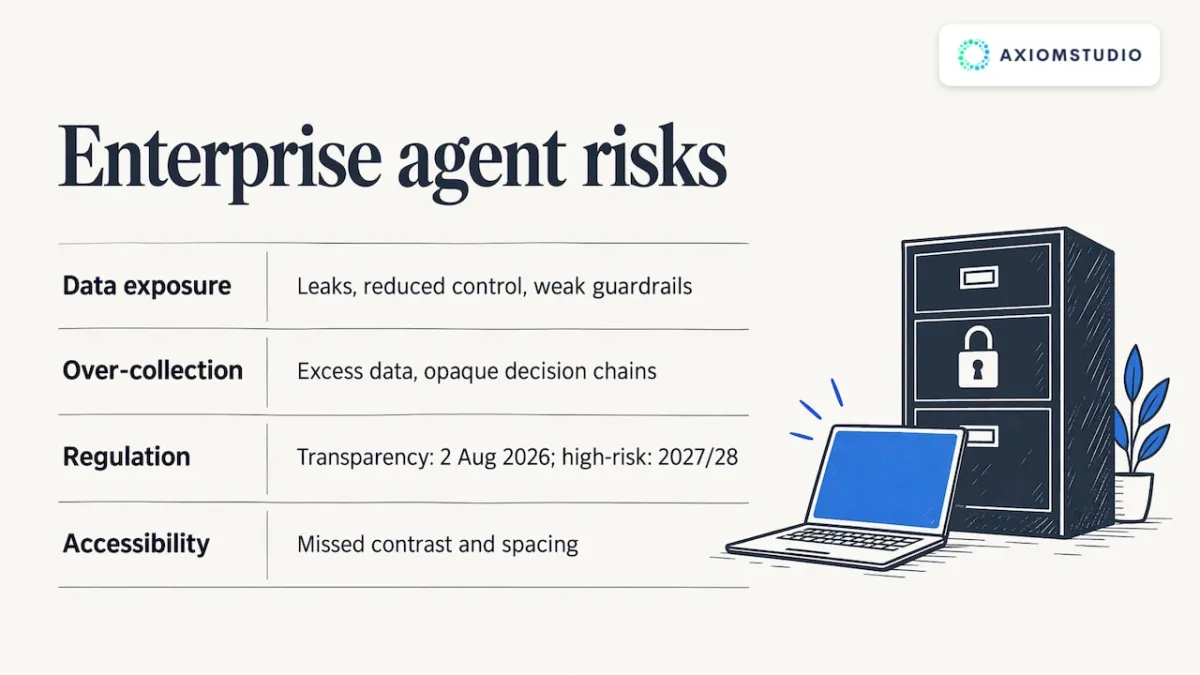
For security and compliance teams, AI design agent governance starts with treating a UX agent as a new identity with access to files, tools and sometimes customer data. Assess four areas.
Data exposure. An academic framework for GUI agents groups the privacy and security risks into three: amplified data leaks, diminished control as agents handle data autonomously, and insufficient guardrails. The last includes adversarial attacks, one of which the authors demonstrated on a real website. Give agents the narrowest scopes that let them do the task.
Over-collection and opacity. An industry white paper from the Centre for Information Policy Leadership warns that agentic systems can pull more data than a task needs and create opacity across multi-agent decision chains. Its recommendation is audit trails that log agents’ decisions, inputs and outputs.
Regulation. The EU AI Act Service Desk explains that AI agents are not a separate legal category. They fall under the Act’s definitions of AI system and general-purpose AI model, and transparency rules apply from 2 August 2026 when an agent interacts with people or generates content. An agent that classifies as a high-risk AI system faces further requirements from 2 December 2027 or 2 August 2028. If you sell into the EU, ask your legal team which of your agent-assisted features fall under these rules. In the US, check your sector rules and your SOC 2 and customer contract commitments.
Accessibility. Agents miss contrast and spacing, as the NN/g tests showed. Treat an AI accessibility review as a first pass: run accessibility checks as a required gate and do not treat the agent’s own audit as the final word.
Where agent output meets production code
A UX agent that implements a screen, updates a component or opens a ticket produces AI-generated changes. They carry the same central risk as any AI coding: output moves faster than review. This is the point where our products apply.
VibeFlow runs a team of nine AI personas that coordinate through work items: features, todos and issues on a Kanban board, with sync to Jira, Linear, ClickUp or Azure DevOps. Its UX Designer agent reviews interface work on items flagged for UX input. It applies Nielsen’s ten usability heuristics and audits accessibility to WCAG AA: text contrast of at least 4.5:1, UI contrast of at least 3:1, 44px touch targets, keyboard navigation and screen reader support. It also checks design-system tokens, component reuse and interaction states. With the Figma connection, it compares the build with your design. Findings become UX feedback and issues on the work item. The agent does not write code or generate mockups, so the people who own the design keep the decisions.
After an item is built, the Security Lead persona reviews it for vulnerabilities and can record compliance findings, and the QA Lead tests it against the requirements. Every work item keeps an append-only execution log, which gives you the audit trail. Vera, our code review agent, reviews the pull request itself on GitHub, GitLab, Bitbucket or Azure DevOps Repos. See how an AI code review agent works in five stages and how to measure precision, recall and noise, so you know your review layer is catching problems and not generating busywork.
If your team is still mapping how agents fit its delivery pipeline, our guides on agent workflows in enterprise software development and governed AI engineering from backlog to production show the model end to end.
How to introduce a UX agent safely
Evaluation and rollout work best as a sequence. Each step has a typical failure and a fix.
- Pick one bounded workflow. Choose something specification-like, such as edge-case lists for a single feature or an accessibility audit of one flow. Failure: starting with open-ended “redesign the product” goals. Fix: write the goal, the inputs and what done looks like.
- Write the access policy first. List what the agent can read and change, which tools it may call and what needs approval. Failure: granting broad access for convenience. Fix: use the starting levels in the table above, then move a task up the dial only as its record supports.
- Give it your context. Feed it your design system, tokens, component library and real flows so the output matches your product. Failure: generic wireframes. Fix: treat missing context as the first thing to repair.
- Define acceptance criteria before you run it. Use heuristics, accessibility checks and the quality bar you hold junior work to. Failure: judging by whether the output looks polished. Fix: score against the criteria, not the impression.
- Route output through a tracked change. Every agent change becomes a work item and a pull request with a named approver. In VibeFlow, the work item carries the UX findings and the execution log, and Vera reviews the pull request. Failure: output pasted in from a chat window with no record. Fix: no record, no merge.
- Review security and compliance on every change. Tag work items with the frameworks you report against, such as SOC 2, and have security review record findings before release instead of waiting for a quarterly audit.
- Measure, then raise autonomy. Track review time, defects found after merge, rework rate and how often reviewers reject agent output. Raise a task’s autonomy only when those numbers hold for several cycles. Failure: reviewers who approve everything. Fix: sample approved changes and check what review caught.
- Protect skill growth. The systematic review notes that mundane tasks are a pathway to seniority, and that overreliance can hinder junior designers. Keep juniors reviewing and critiquing agent output so they build judgment.
For platform and DevOps owners, integrating AI agents into your existing DevOps pipeline covers the pipeline side, and the VibeFlow page for platform teams covers role-specific setup.
Put governed delivery in place
If your designers and engineers already use agents, the question is whether each AI-generated change is reviewed and logged before it ships. VibeFlow puts the work items, the agent personas and the review in one place, so design findings, code review and security review stay attached to the change they cover.
Our pricing page lists a free Starter plan, Pro at $20 per month, and Team at $49 per seat per month with a three-seat minimum. Enterprise is available too, and Vera is free on every plan. If you need to see how it fits your security and audit requirements, you can request a demo.
Sources
- Agentic Design Report: Adoption, Productivity, Limits
- Imagining Design Workflows in Agentic AI Futures (OZCHI 2025)
- AI Prototyping in Real Design Contexts, NN/g
- AI UX Research Agent, Figma
- Interaction Design with Generative AI: An Empirical Study
- Vibe Coding for UX Design: Understanding UX Professionals’ Perspectives
- Designing With AI: A Systematic Literature Review
- Why AI-generated UI looks alike
- Where AI Helps a Design Workflow, and Where It Does Not (CI/HCOMP 2026)
- Designing For Agentic AI: Practical UX Patterns, Smashing Magazine
- Top 5 AI Trends Enhancing UX Design in 2026, Monterail
- Designing The Internet of Agents, Outshift by Cisco
- Mapping the Design Space of User Experience for Computer-Use Agents
- Toward a Human-Centered Evaluation Framework for Trustworthy LLM-Powered GUI Agents
- Agentic AI white paper, Centre for Information Policy Leadership
- How are AI agents addressed within the AI Act?, EU AI Act Service Desk
- VibeFlow personas
Frequently Asked Questions
Is an AI UX designer agent the same as an AI design tool?
No. A tool or assistant handles one request and returns an output. An agent works toward a goal through connected steps: it acts, observes the result and revises. That autonomy is why agents need scopes, approval rules and an audit trail that simple tools do not.
Will an AI UX agent replace a human UX designer?
The evidence points to collaboration. Nielsen Norman Group found AI prototyping tools lacked the judgment to weigh design tradeoffs, and professional designers in a 2025 OZCHI study wanted to keep authority over creative decisions. In a 2026 Samsung SDS study of AI agents across design thinking stages, the gains came on structured artifacts, while humans did better at interpreting users' emotions.
How much autonomy should I give a UX agent?
Set it per task, not per agent. Start at Observe and Suggest or Act with Confirmation, and move a task up only after repeated review shows consistent quality. Keep a named approver for anything that changes production code, user data or permissions.
What should security and compliance teams check first?
Check what data the agent can access, what actions it can take and whether every action is logged. Then confirm that each change passes review before merge. If you serve EU users, confirm with legal how the AI Act's transparency rules apply to your agent-assisted features.
What does the VibeFlow UX Designer agent do?
It reviews interface work on items flagged for UX input. It applies Nielsen's ten usability heuristics, audits accessibility to WCAG AA and checks design-system consistency, and with the Figma connection it compares the build with the design. It writes findings as UX feedback and issues, and it does not write code or generate mockups.
Written by
Axiom Studio