Top AI Code Review Tools for Engineering Teams
Compare six AI code review tools by Git support, cost, model choice, verification, merge gates, and repair workflows. See why Vera stands out for multi-model reviews.
 Axiom Studio November 9, 2026 12 min read
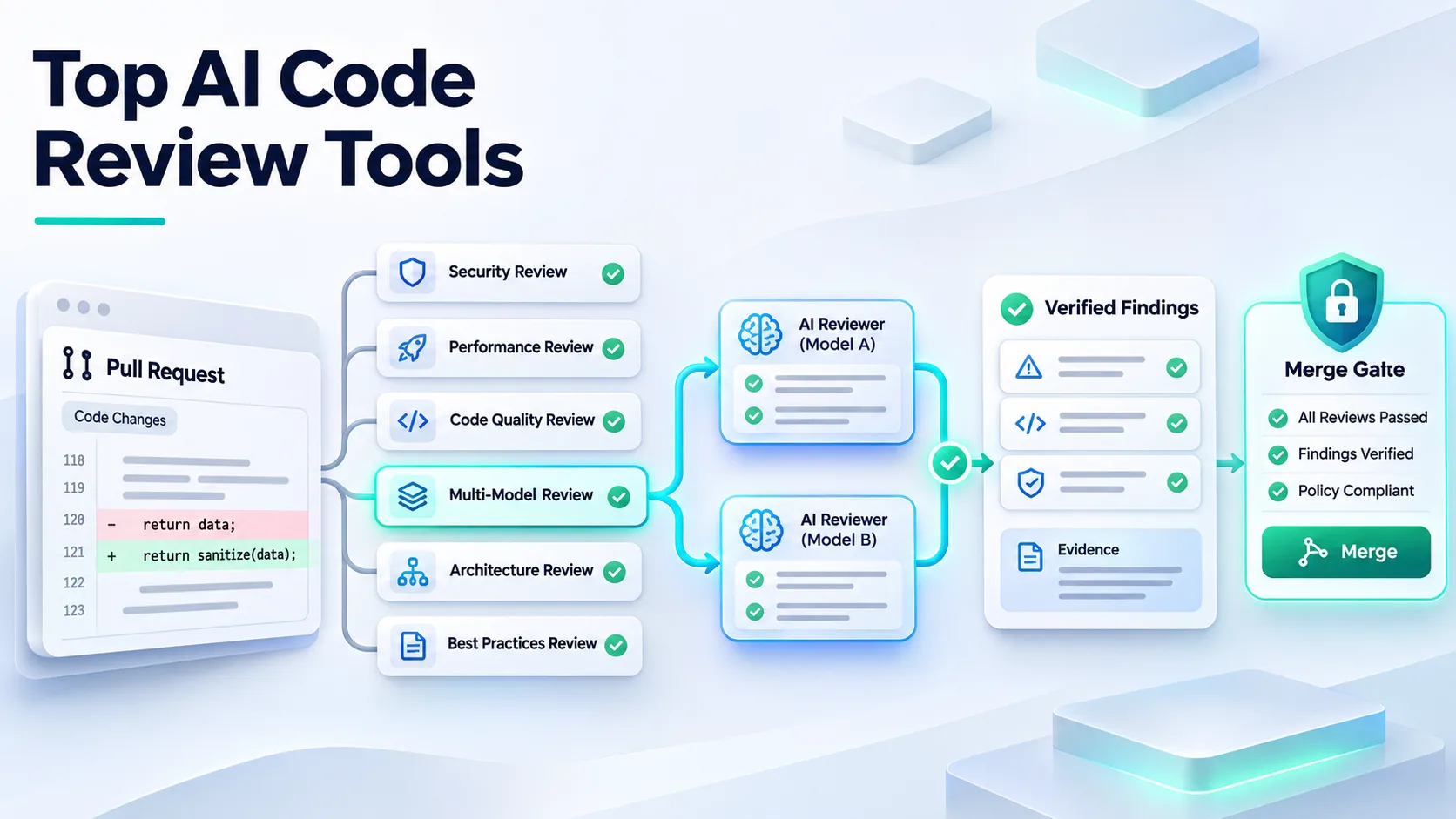
The top AI code review tools for engineering teams are Vera, CodeRabbit, Greptile, GitHub Copilot code review, Claude Code Review, and Graphite. Vera is a strong default for teams that want multi-model review, broad Git support, and no seat fees. The others win on specific workflows, from GitHub-native review to stacked pull requests.
AI code review tools give a first pass on every pull request. They flag risky changes, missed tests, or broken rules so people can focus. They should not replace human judgment.
This is an editorial shortlist from Axiom Studio, which makes Vera, based on live product pages. It is not a paid ranking, lab test, or claim that one tool catches more bugs than another.
Best AI code review tools at a glance
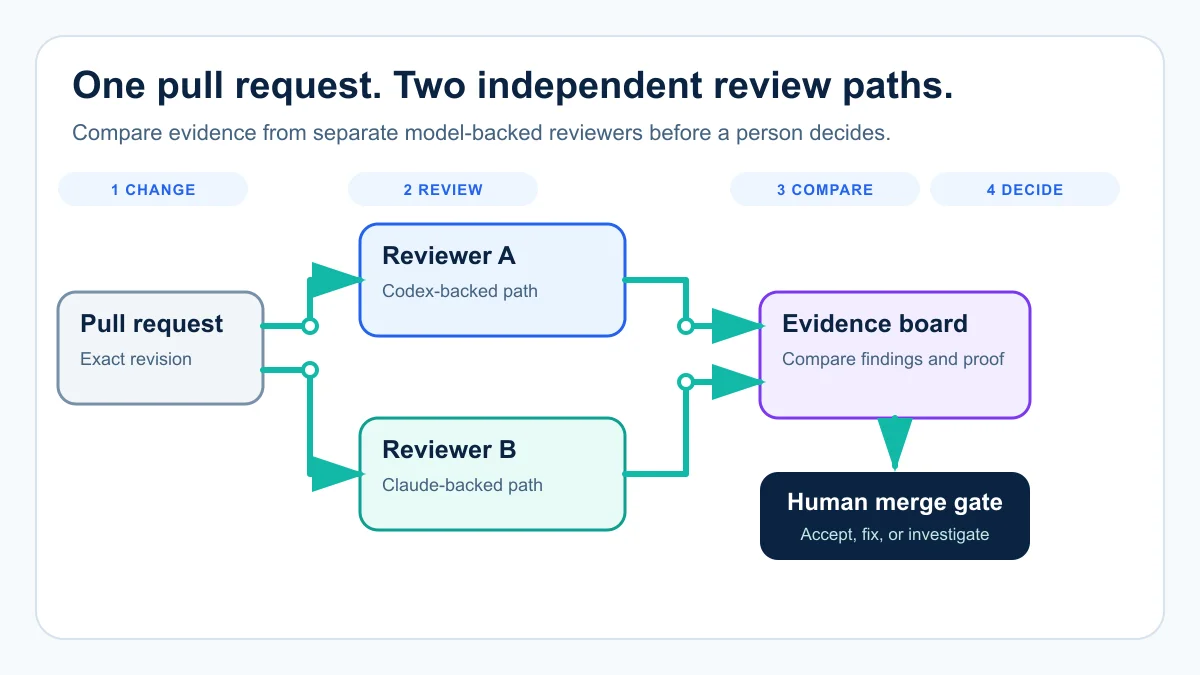
Figure — Separate Vera runners can use different supported coding agents. People compare the evidence before the merge decision.
| Feature | Vera | CodeRabbit | Greptile | GitHub Copilot | Claude Review | Graphite |
|---|---|---|---|---|---|---|
| Automatic PR review | ✓ | ✓ | ✓ | ✓ | ✓ | ✓ |
| Review every new push | ✓ | ✓ | ✓ | ✓ | ✓ | ✓ |
| GitHub support | ✓ | ✓ | ✓ | ✓ | ✓ | ✓ |
| GitLab support | ✓ | ✓ | ✓ | ✕ | ✕ | ✕ |
| Bitbucket support | ✓ | ✓ | ✓ | ✕ | ✕ | ✕ |
| Azure DevOps Repos | ✓ | ✓ | ✕ | ◐ Preview | ✕ | ✕ |
| Free unlimited private reviews | ✓ | ✕ | ✕ | ✕ | ✕ | ✕ |
| Unlimited users without seat fees | ✓ | ✕ | ◐ Credits | ✕ | ✕ | ✕ |
| Choose the coding agent | ✓ | ✕ | ✕ | ✕ | ✕ | ✕ |
| LLM or provider independence | ✓ | ✕ | ✕ | ✕ | ✕ | ✕ |
| Different model-backed reviewers | ✓ | ✕ | ✕ | ◐ Vendor-set | ✕ | ✕ |
| Evidence and verification steps | ✓ | ✕ | ✕ | ✕ | ✓ | ✕ |
| Tracker ticket workflow | ✓ | ✓ | ◐ Context | ✕ | ✕ | ✕ |
| Required merge check or approval | ✓ | ✓ | ✕ | ✓ | ✕ | ◐ Workflow |
| Fresh review verifies repairs | ✓ | ✓ | ◐ Handoff | ✓ | ✓ | ✓ |
| AI SDLC team add-on | ✓ | ✕ | ✕ | ✕ | ✕ | ✕ |
| Security and QA agent roles | ✓ | ✕ | ✕ | ✕ | ✕ | ✕ |
✓ = documented native feature. ◐ = limited, plan-specific, preview, or partial. ✕ = not found as a native feature in the public sources checked on November 10, 2026.
| Tool | Best for | Price | Watch for |
|---|---|---|---|
| Vera | Multi-model review, broad Git support, and AI SDLC workflows | Free forever. Unlimited users and reviews. | Teams need a policy for disagreements between review paths. |
| CodeRabbit | Review in pull requests, the IDE, CLI, and agent loops | Essentials starts at $24 per user each month, billed annually. | Cost grows with the number of users and higher plans. |
| Greptile | Shared, usage-based review with cross-repo context | Free for one active developer with 50 credits each month. Pro is $1 per credit. | Review depth changes credit use. |
| GitHub Copilot code review | GitHub teams that want review inside the pull request | AI credits plus GitHub Actions minutes | Cost changes with pull request size, effort, instructions, and Actions use. |
| Claude Code Review | Team and Enterprise customers that want deep GitHub review | Billed separately through usage credits | It does not approve or block the pull request, and it is tied to Anthropic’s review service. |
| Graphite | GitHub teams that also want stacked changes and a merge queue | Hobby is free with limited AI reviews. Starter is $20 and Team is $40 per user each month, both billed annually. | Unlimited AI reviews sit in the Team plan, not the lower plans. |
Source: Vendor pricing pages checked November 10, 2026
Seat pricing grows with headcount, while Copilot and Greptile charge by review depth. Switch between the views to compare the models.
1. Vera by Axiom Studio: best for multi-model review and AI SDLC workflows
Vera gives teams a model-independent review layer. It runs through supported coding agents such as Codex, Claude, Gemini, Qwen, and Cursor. Separate runners can use different agents, so one runner can review with Codex while another uses Claude on the same pull request revision.
Different models may spot different bugs, security risks, or edge cases. Teams can mix review paths based on the repository, task, cost, or risk. For how one pull request can be split across correctness, security, test, and architecture reviewers, see how specialist AI agents split a pull request.
Vera also works independently from the agent that wrote the code. Code written by Claude can be reviewed through Codex, and code written by Cursor through Claude. This reduces the risk of asking the same system to judge its own work.
Each review runs in a fresh session and disposable worktree, and VibeFlow, the AI SDLC platform behind Vera, supports concurrent reviews through its runner configuration. Vera records findings against an exact pull request revision. A finding can include:
- The file and line where the issue starts.
- The condition that triggers it.
- The likely customer or system impact.
- The code evidence behind the finding.
- The commands used to verify it.
- A blocker or advisory rating.
flowchart LR
    A[Vera finds blocker] --> B[Repair ticket]
    B --> C[Coding agent fixes PR]
    C --> D[Fresh Vera review]
    D --> E[Finding closes]
Confirmed blockers become repair tickets, a Developer, Architect, or Principal Engineer agent fixes them on the same pull request, and the finding closes only after a fresh Vera session verifies the new revision.
Vera can act as a required merge check on GitHub, GitLab, Bitbucket, and Azure DevOps Repos. It can file work in Linear, Jira, ClickUp, Inflectra, Azure DevOps, or GitHub Issues.
Vera is free forever on every Axiom Studio plan, with unlimited users and reviews. Teams can add the wider VibeFlow AI SDLC team when they need Developer, Architect, Principal Engineer, Security Lead, and QA Lead agents around the same work.
What to test
A second model does not create automatic truth. Set a rule for disagreements, use a round budget, and keep a person responsible for the merge.
Test true findings, missed issues, noise, review time, and cost on your own pull requests. The AI code review agent scorecard gives a measurement plan, and the anatomy of an AI code review agent explains what evidence to expect.
2. CodeRabbit: best for a broad review workflow
CodeRabbit puts review in pull requests, the command line, the IDE, and agent loops. Its current Essentials plan includes agentic reviews, chat, pre-merge checks, one-click fixes, and learning from team feedback.
The Team and Advanced plans add more work around tests, triage, risk, security, and architecture. This can help a team that wants one paid review product across many parts of the coding flow.
The trade-off is seat cost. The current CodeRabbit pricing page lists Essentials at $24 per user each month, Team at $48, and Advanced at $72, all with annual billing; monthly billing is $30, $60, and $90. Enterprise pricing is custom. Pilot with the people who open and review the most pull requests, then model the full team cost.
3. Greptile: best for shared usage pricing
Greptile reviews pull requests with codebase context. Its Pro plan includes cross-repo context, a team dashboard, custom context, and links to Jira, Linear, Notion, and coding agents.
The free Starter plan is for one active developer and includes 50 credits each month. Pro has no seat fee. It charges $1 per credit and shares credits across the organization. A Base review uses one credit, Plus uses three, and Apex uses ten.
This fits a team whose review load changes month to month. It can also make cost harder to predict if many large pull requests use deeper review levels. Track credits per merged pull request during the trial.
4. GitHub Copilot code review: best for GitHub-native teams
GitHub Copilot code review lives inside GitHub. A developer can request it as a reviewer, or a team can set automatic review rules.
GitHub offers Lite, Balanced, and Max effort levels. Higher levels use more AI credits, and reviews can also use GitHub Actions minutes. GitHub says a review costs about $0.25 on average for Lite, $1.50 for Balanced, and $10 for Max. These are estimates, not fixed prices.
The main gain is a familiar workflow. The main cost risk is the mix of AI credits and Actions minutes. Review of new pushes must be set up if the team wants a fresh pass after every change. Read GitHub’s official Copilot code review guide before rollout.
5. Claude Code Review: best for deep GitHub review
Claude Code Review is a managed review product for Team and Enterprise customers. Several specialized agents inspect the diff and the wider codebase in parallel for logic errors, security problems, broken edge cases, and regressions.
A verification step checks findings before Claude posts inline comments. Reviews can run when a pull request opens, after every push, or on request. Usage credits are billed separately. Anthropic says reviews take about 20 minutes on average, but cost and time change with pull request size and complexity.
It does not approve or block the pull request, and it differs from building a custom review workflow with the general Claude Code CLI or GitHub Action. Read Anthropic’s official setup guide.
6. Graphite: best for review plus pull request flow
Graphite combines AI review with tools for pull requests, stacked changes, team insight, and merge flow. This makes it useful when the problem is larger than review comments alone.
The Hobby plan is free and has limited AI reviews. On Graphite’s pricing page, Starter is $20 per user each month and Team is $40 per user each month, both billed annually. Team adds unlimited AI reviews, custom review rules, automations, and a merge queue.
Graphite fits a GitHub team that wants one place for review and pull request flow. It may be more product than a team needs if the only goal is a first-pass AI review.
How to choose the right AI code review tool
Start with the workflow
Ask where review must happen. Some teams need GitHub only; others need GitLab, Bitbucket, or Azure DevOps. Some want review before a pull request. Others need review inside the pull request and a ticket after the finding.
Count the whole cost
Do not compare only the list price. Use this simple model:
Monthly review cost = license or credits + model use + runner use + human review time + retry time
A low price can still cost more if the tool posts noise. A higher price can be worth it if it cuts review rounds and catches real blockers. Even with no seat fee, count the time people spend checking findings.
Test the same pull requests
Run a fair pilot
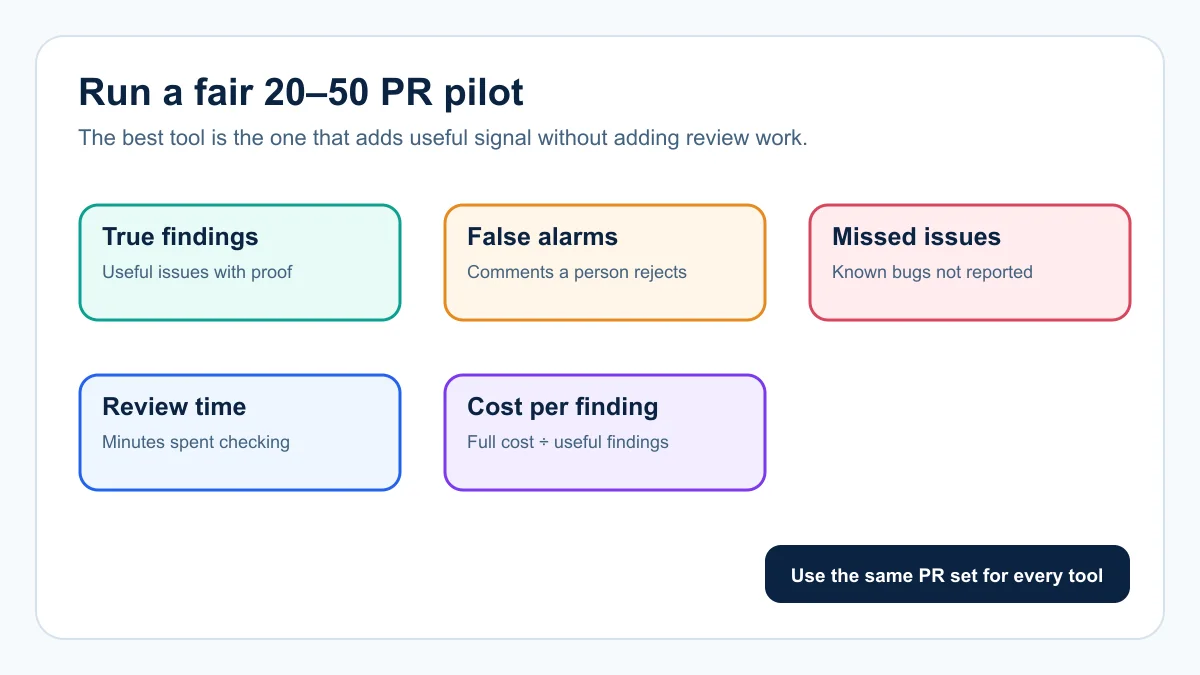
- Pick 20 to 50 past pull requests. Include known bugs, security issues, cross-file changes, missing tests, and clean changes.
- Give every tool the same input. Use the same code and the same rules.
- Track five numbers. True findings, false alarms, missed known issues, minutes a person spends checking comments, and cost per useful finding.
- Ignore the best demo. A vendor demo is not your code, rules, or risks.
Figure — A fair pilot uses the same pull requests and measures signal, noise, time, and cost.
Keep a human merge gate
AI review is a first pass, and a person still owns the merge. Require proof for high-risk findings, keep logs of the reviewed commit, and re-run review after code changes. Use security tests and normal CI checks too. The GitHub and GitLab merge gate guide walks through install, first review, gate rollout, and rollback.
The bottom line
The best AI code review tool adds useful signal without slowing the team down. Vera’s main advantage is choice: different coding agents and model providers, independent review paths, and verified repairs on a new revision. Start with a fair pilot and measure signal, noise, time, full cost, and the value of a second model-backed review.
Ready to run that pilot? Try Vera AI code review on your own pull requests, or request a demo to see multi-model review and verified repairs on a live pull request.
Frequently Asked Questions
What is an AI code review tool?
An AI code review tool gives a first pass on every pull request or merge request. It can flag a risky change, show a missed test, or point to a rule the code breaks, so human reviewers can focus on design, intent, and risk.
Which AI code review tools work outside GitHub?
Vera and CodeRabbit work with GitHub, GitLab, Bitbucket, and Azure DevOps. Greptile supports GitHub, GitLab, and Bitbucket. GitHub Copilot code review is built around GitHub, with Azure DevOps support in preview. Claude Code Review and Graphite are built around GitHub. Check each vendor's current integration list before a pilot.
Are AI code review tools a replacement for human reviewers?
No. They are best used as a first pass. People still own design choices, product intent, risk, and the final merge.
Which AI code review tool is free for a whole team?
Vera is free forever with unlimited users and unlimited reviews. It also has no separate LLM subscription requirement. Other tools on this list offer free tiers or trials with different limits.
How should a team compare AI code review tools?
Use the same set of old pull requests for each tool. Track true findings, false alarms, missed issues, review time, retries, and total cost.
Can AI review agent-written code?
Yes. A separate review pass can check code written by Codex, Claude, Cursor, Gemini, or another coding agent. A person should still own the final decision.
Written by
Axiom Studio