Install in one line
Requires Go 1.25+ and tmux 3.2+. Everything else is embedded in the binary.
go install vibeflow-cli/cmd/vibeflow@latestThen run vibeflow to launch the TUI.
git clone https://github.com/axiom-studio/vibeflow-cli.git
cd vibeflow-cli
go build -o vibeflow ./cmd/vibeflow
Full Go source — inspectable, auditable, forkable.
Everything you need to run a team of AI agents
A wizard-driven launch flow, isolated runtime environments, built-in error recovery, and a bundled Claude Code Plugin — all shipped as a single Go binary.
Multi-Session Management
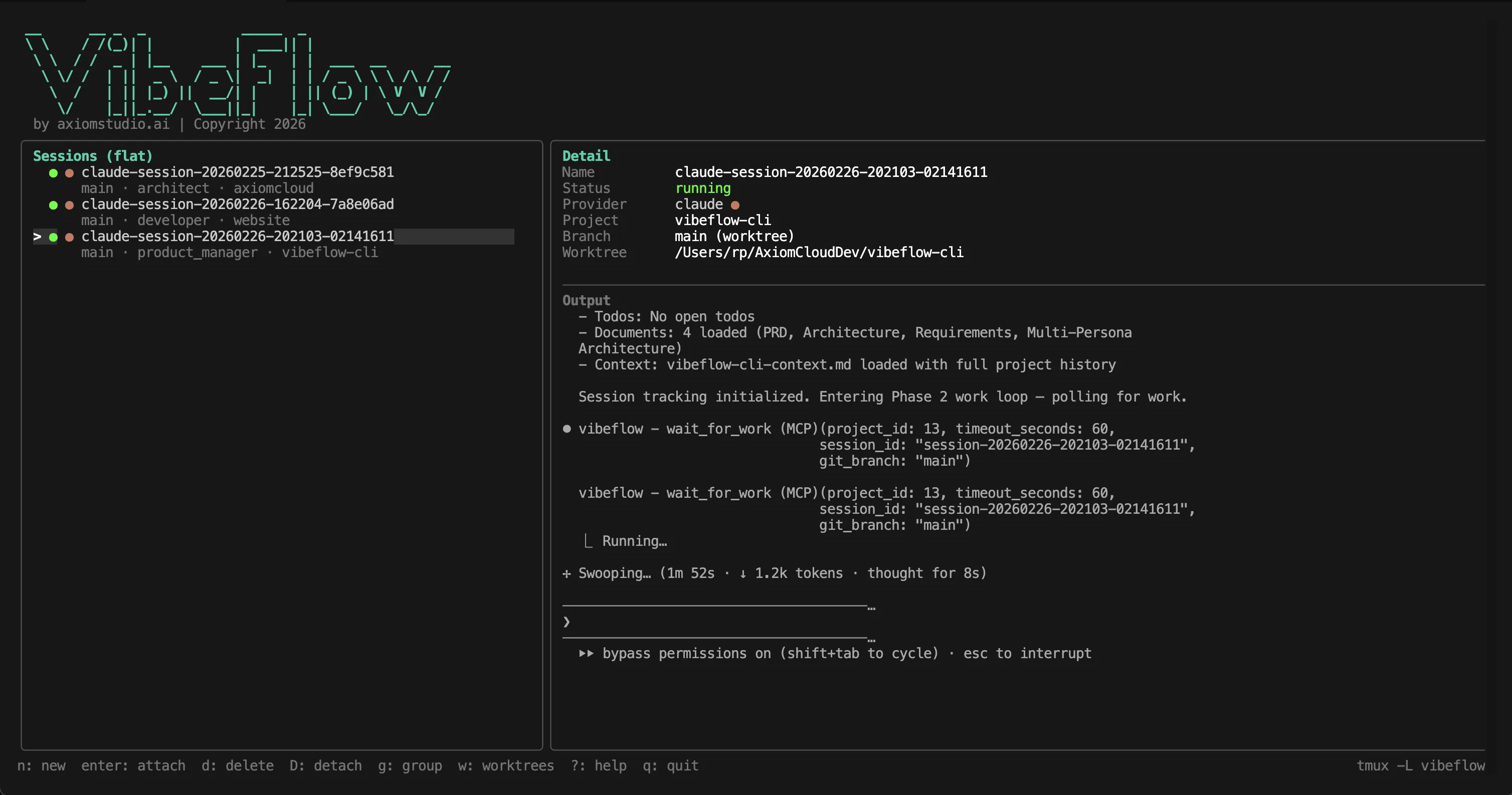
Launch every AI coding session from a single TUI. See every session's provider, branch, persona, and status at a glance — and switch between them with one keypress.
Any AI Coding Agent
First-class support for Claude Code, OpenAI Codex CLI, and Google Gemini CLI. Extend the built-in templates with any custom agent binary through YAML configuration.
Persona-Based Teams
Assign specialized personas — Developer, Architect, QA Lead, Security Lead, PM, Principal Engineer — so several agents can collaborate on the same repo without stepping on each other.
Git Worktree Isolation
Every session runs in its own git worktree on its own branch. No merge conflicts between concurrent agents. Configurable cleanup when sessions end.
Autonomous Execution
Opt into VibeFlow server mode and agents become fully autonomous — polling tasks, implementing, committing, and reporting back while you supervise.
Single Go Binary
Zero external dependencies beyond tmux. Providers, launch templates, agent docs, and the full TUI are all embedded. Runs on macOS and Linux out of the box.
Session Conflict Detection
If two agents try to target the same directory, VibeFlow offers four clean resolutions: switch to existing, create a new worktree, clean up the stale session, or cancel.
Error Recovery Pipeline
Pattern registry, health monitor, and auto-recovery with exponential backoff handle 429/529/5xx gracefully. Dead sessions restart with one tap, full original parameters restored.
Auto-Embedded Agent Docs
CLAUDE.md, AGENTS.md, and GEMINI.md are auto-copied into the working directory on launch, so every agent picks up project conventions before writing a line of code.
Inspectable, auditable, forkable
Every line of code, every agent doc, every provider template lives in a public repository you control. No hidden binaries. No mandatory SaaS.
github.com/axiom-studio/vibeflow-cliApache License 2.0
Permissive, commercially friendly, with an explicit patent grant. Read the LICENSE file in the public repo.
Zero lock-in
Vanilla mode works fully standalone with no VibeFlow server account. Autonomous mode is optional, additive capability — never a gate.
Inspectable agent docs
Every behavioral rule an agent follows lives in `vibecoding-agent-docs/` in the public repo. Read, audit, fork, and extend.
Config-extensible
Providers, launch templates, worktree strategies, and error recovery live in `~/.vibeflow-cli/config.yaml`. Add a new agent without recompiling.
Without vs. with VibeFlow CLI
The day-to-day difference between juggling terminal tabs and running a managed multi-agent workflow.
Who it's for
From a solo developer running three agents on three branches to a platform team standardizing AI coding across an entire org.
Individual developers running multiple AI agents
Stop losing track of which terminal tab has which agent on which branch. Launch every Claude/Codex/Gemini session from one wizard, switch with a single keypress, and never accidentally point two agents at the same working tree.
Platform & developer experience teams
Standardize how your engineering org runs AI coding agents. Ship one CLI, one config format, one set of session rules — and get tmux isolation, worktree hygiene, persona assignments, and error recovery for free.
Open-source-conscious engineering orgs
Apache 2.0, public repo, inspectable agent docs, no mandatory SaaS dependency. Self-host the server component or run fully local in Vanilla mode — every behavior your agents follow can be read, audited, and forked.
Teams building autonomous agent pipelines
The VibeFlow server integration turns personas into a lightweight orchestration layer. Run Developer and Architect agents on the same feature, each picking up work items filtered to its role, without either blocking the other.
Frequently asked questions
Everything you need to know before installing.
What is VibeFlow CLI?
Is VibeFlow CLI open source?
Which AI coding agents does VibeFlow CLI support?
How do I install VibeFlow CLI?
Do I need a VibeFlow server to use the CLI?
How does VibeFlow CLI isolate multiple agents?
What happens if an agent crashes or a session dies?
How does VibeFlow CLI differ from running agents directly in tmux?
What platforms does VibeFlow CLI run on?
VibeFlow CLI is the terminal companion to VibeFlow, the full AI engineering team platform. See how autonomous sessions fit into the broader agentic coding workflow. For agent tool governance see the MCP Gateway, and for model access see the LLM Gateway. Learn more on the Axiom blog.