LLM Gateway vs API Gateway: What and Why Teams Still Need
Learn what an LLM gateway adds, why teams still need it beside an API gateway, and how to test token, routing, data, and cost controls.
 Axiom Studio November 3, 2026 9 min read
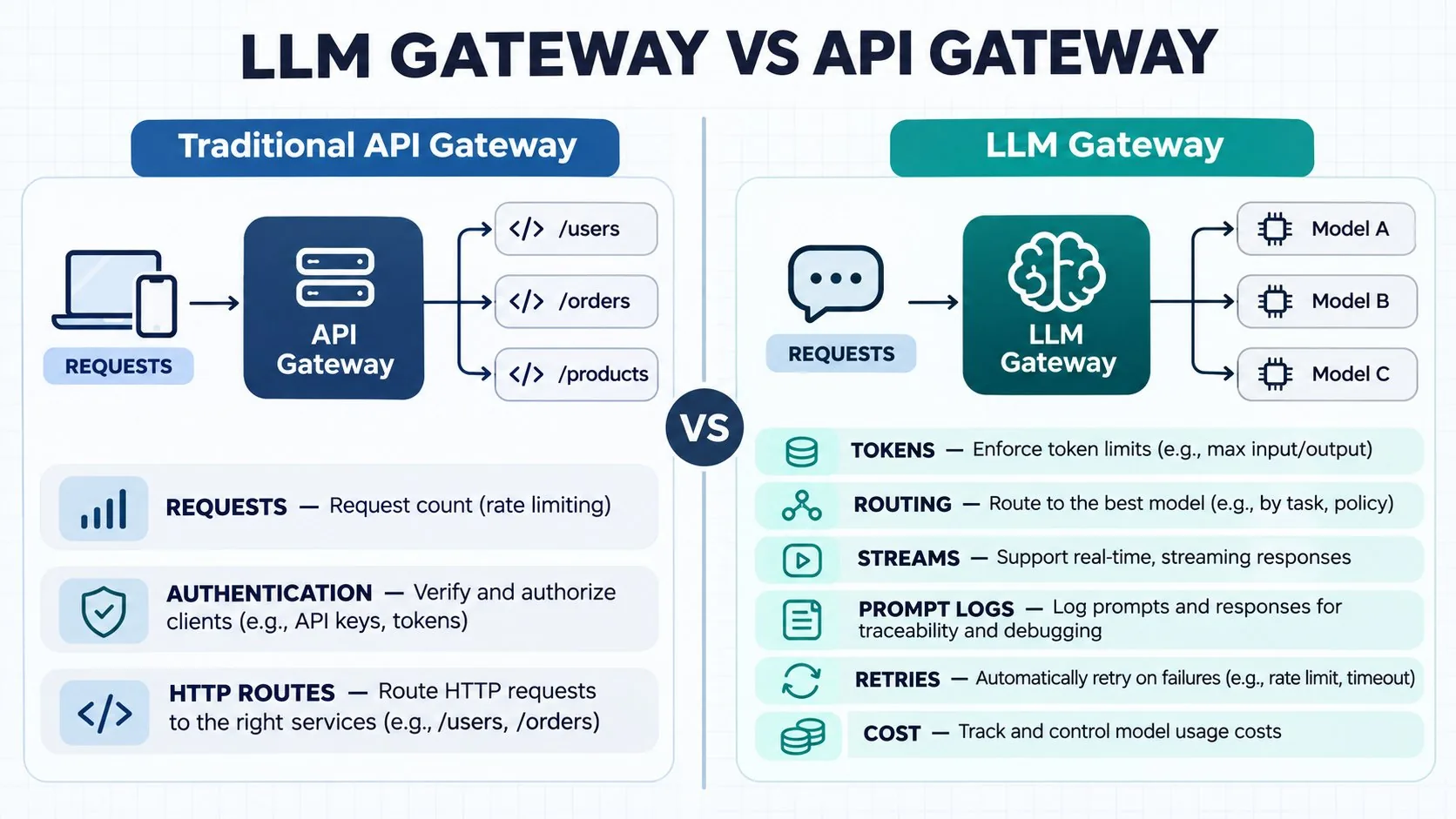
Short answer: an API gateway manages HTTP traffic, identity, and request limits. An LLM gateway adds controls for tokens, streamed output, model routing, fallback, prompt data, and AI cost. Most teams that run AI in production need both layers.
Table of contents
- API gateway and LLM gateway compared
- What an LLM gateway adds
- When teams still need an LLM gateway
- How to evaluate an existing gateway
- How to test the controls
- Key takeaways and FAQ
Comparison at a glance
| Need | API gateway | LLM gateway |
|---|---|---|
| Traffic limits | Counts requests | Counts requests, tokens, and cost |
| Routing | Routes to a service | Routes by provider, model, task, or policy |
| Streaming | Handles a long connection | Records stop, failure, and usage states |
| Data control | Applies identity and payload rules | Checks prompts, responses, and model access |
| Failure handling | Retries an endpoint | Applies controlled model fallback |
| Cost records | Tracks API traffic | Tracks tokens, retries, routes, and model cost |
What is an API gateway?
An API gateway sits between an app and its services. It gives teams one place to manage traffic.
A normal API gateway can check identity, route a request, add headers, set request limits, block known attacks, and collect HTTP logs. These controls still matter for AI apps. The gap starts when the gateway sees every model call as a normal HTTP request.
What is an LLM gateway?
An LLM gateway is a control point built for large language model traffic. It knows that a call has prompts, tokens, model names, streamed output, tool calls, and provider rules.
It can give one app a common path to several model providers. It can also keep provider keys away from app code. An LLM gateway does not replace every API security tool. It adds AI controls that a basic API gateway may not have.
What does an LLM gateway add?
1. Token-aware limits
A request limit counts calls. It does not show how large each call is. One request may use 500 tokens. Another may use 500,000. They both count as one request in a basic limit.
An LLM gateway can set rules for input tokens, output tokens, total tokens, or estimated cost. This helps stop one app, user, or job from using too much of a shared budget.
2. Stream tracking
Many AI apps show words as the model creates them. The link may stay open for a long time.
The gateway must handle a user who stops the answer, a provider that drops the stream, or an error near the end. It should record whether the call finished, failed, or stopped early. A simple HTTP status may not tell the full story.
3. Model and provider routing
AI teams often use more than one model. One may be best for code. Another may be cheaper for a simple label. A third may be required for data rules in one region.
An LLM gateway can route calls by model, team, task, price, or policy. It can also give the app one common API shape when providers use different formats.
4. Controlled fallback
A fallback can send work to another model when the first model is down or busy. This can keep an app running.
Fallback also creates risk. The second model may cost more, answer in a different way, or run in another region. Teams need a clear rule, reason code, and audit record for every switch.
5. Prompt and response controls
A prompt may include source code, customer data, health details, or store records. A response may repeat that data.
LLM gateways can help redact fields, block unsafe patterns, control which models may receive a prompt, and limit who can read logs. Teams also need clear rules for how long prompt data is kept.
6. AI usage and cost records
A useful AI record includes the app, user, model, provider, input tokens, output tokens, cache use, retry count, response time, and final route.
The model bill is only one cost. Teams may also pay for gateway hosting, logs, tools, retries, and human review. Good records show where the cost starts.
Why do teams still need an LLM gateway?
Teams need an LLM gateway when AI traffic creates gaps that the current gateway cannot close.
Cost: Request counts do not show token use. A few large prompts can cost more than many small calls.
Reliability: Model providers can slow down, reject a call, or change limits. Teams need routing and fallback rules that explain what happened.
Data control: Prompts and answers can hold private data. Access, redaction, and retention rules must cover that content.
Model choice: Teams want to change models without adding new keys and provider code to every app.
Audit work: Security, finance, and engineering teams need one record of who used which model, why it was routed, and what it cost.
Can an existing API gateway handle AI traffic?
There is no one answer for every team. Kong and Google Apigee now offer AI gateway features.
Kong documents token and cost-aware limits, AI routing, prompt policies, and guardrails. Its docs explain that some usage rules depend on token data that the model provider returns and the gateway can read.
Google says Apigee can enforce token limits, route model traffic, log prompts and responses, add analytics, and support AI governance.
A current AI gateway product from either vendor may meet a team’s needs. An older or basic API gateway setup may not. Check the exact product, version, provider support, and policy set you run. Compare working controls, not brand names.
API gateway and LLM gateway compared
Traffic limits
API gateway: requests per second or minute.
LLM gateway: requests plus tokens, output, and cost.
Routing
API gateway: service or endpoint.
LLM gateway: provider, model, task, policy, or fallback.
Logs
API gateway: URL, status, and response time.
LLM gateway: prompt policy, token use, model route, retry, and final cost.
Streams
API gateway: long HTTP connection.
LLM gateway: model stream with stop, failure, and usage state.
Data controls
API gateway: identity, headers, and payload rules.
LLM gateway: prompt checks, redaction, and model access.
Each product supports a different set of features. Test the version you use.
Decision checklist
A team should test an LLM gateway when it needs to:
-
Set token or cost limits.
-
Route work across several models.
-
Explain why fallback occurred.
-
Protect private prompt data.
-
Track streamed responses.
-
Keep provider keys out of application code.
-
Export model, token, retry, and cost records.
How to test what your team needs
Start with one low-risk AI service. Use test data, not private customer data.
Run a short answer, a long stream, a token-limit event, a provider error, a retry, a fallback, a prompt that should be redacted, and a user who cannot call one model.
After each run, check the logs. The token count, route, retry, policy result, and final state should match the event. Check who can see the prompt and how long it is stored.
This is a proposed test plan. It is not a claim that any gateway failed.
Where Axiom fits
Axiom’s LLM Gateway is designed as one entry point for model calls. Its product page and docs describe an OpenAI-compatible API, shared credential control, routing, fallback, load balancing, streaming, usage analytics, audit logs, and Prometheus metrics.
Explore the LLM Gateway.
Read the setup details.
Learn why request counts miss token cost.
Key takeaways
- API gateways still handle core identity and HTTP traffic.
- LLM gateways add controls for models, tokens, prompts, and AI cost.
- Some products can provide both sets of controls.
- Test the exact version and setup your team runs.
Do not replace a working gateway because of a product label. First list the AI controls your apps need. Then test the gateway you already run.
Keep it if it can measure tokens, handle streams, protect prompt data, route models, explain fallbacks, and export useful records. Add an AI layer or move when missing controls create too much cost, risk, or manual work.
Use the test plan above on one service. If you need one control point across models and providers, explore the Axiom LLM Gateway.
Need one control point across models and providers? Explore the LLM Gateway or request a demo to test your current controls.
Research notes
Checked November 3, 2026.
Axiom product and docs support the stated Axiom capabilities. No savings or benchmark claim is made.
External source: Kong AI rate limiting documentation: https://developer.konghq.com/ai-gateway/policies/ai-rate-limiting-advanced/
Also reviewed Google Cloud’s current Apigee AI solution page.
Claim boundary: This article compares control needs. It does not claim Kong or Apigee failed a test.
Frequently asked questions
What is the difference between an API gateway and an LLM gateway?
An API gateway manages identity, routing, request limits, and HTTP traffic. An LLM gateway adds controls for tokens, streamed model output, provider and model routing, prompt data, fallbacks, and AI usage cost.
When does a team need an LLM gateway?
A team should evaluate an LLM gateway when AI traffic creates gaps that its current gateway cannot close, such as token-based cost, model choice, prompt-data controls, provider fallback, or AI-specific audit records.
Are Kong and Apigee enough for AI traffic?
There is no universal answer. Current Kong and Google Apigee products offer AI gateway capabilities, but teams should check the exact product, version, provider support, and policy set they run rather than rely on the vendor name.
How should a team test an LLM gateway?
Use one low-risk AI service and test a short answer, long stream, token-limit event, provider error, retry, fallback, redaction rule, and denied model call. Then verify token counts, route, policy result, final state, access, and retention in the logs.
Frequently Asked Questions
What is the difference between an API gateway and an LLM gateway?
An API gateway manages identity, routing, request limits, and HTTP traffic. An LLM gateway adds controls for tokens, streamed model output, provider and model routing, prompt data, fallbacks, and AI usage cost.
When does a team need an LLM gateway?
A team should evaluate an LLM gateway when AI traffic creates gaps that its current gateway cannot close, such as token-based cost, model choice, prompt-data controls, provider fallback, or AI-specific audit records.
Are Kong and Apigee enough for AI traffic?
There is no universal answer. Current Kong and Google Apigee products offer AI gateway capabilities, but teams should check the exact product, version, provider support, and policy set they run rather than rely on the vendor name.
How should a team test an LLM gateway?
Use one low-risk AI service and test a short answer, long stream, token-limit event, provider error, retry, fallback, redaction rule, and denied model call. Then verify token counts, route, policy result, final state, access, and retention in the logs.
Written by
Axiom Studio