MCP Tool Policy by Agent, User, Task and Environment
Build least-privilege MCP tool rules by agent, user, task and environment, with approval gates and denied-action tests.
 Axiom Studio November 18, 2026 5 min read
On this page
One shared MCP token can give every agent the same power. That is easy to set up. It is also how a coding task ends up with production write access.
Treat each tool call like an API request. The model may ask for an action, but trusted policy code must decide whether it is allowed. MCP Gateway is built for this control point: agents connect through one gateway, access is restricted by tool, and actions are recorded.
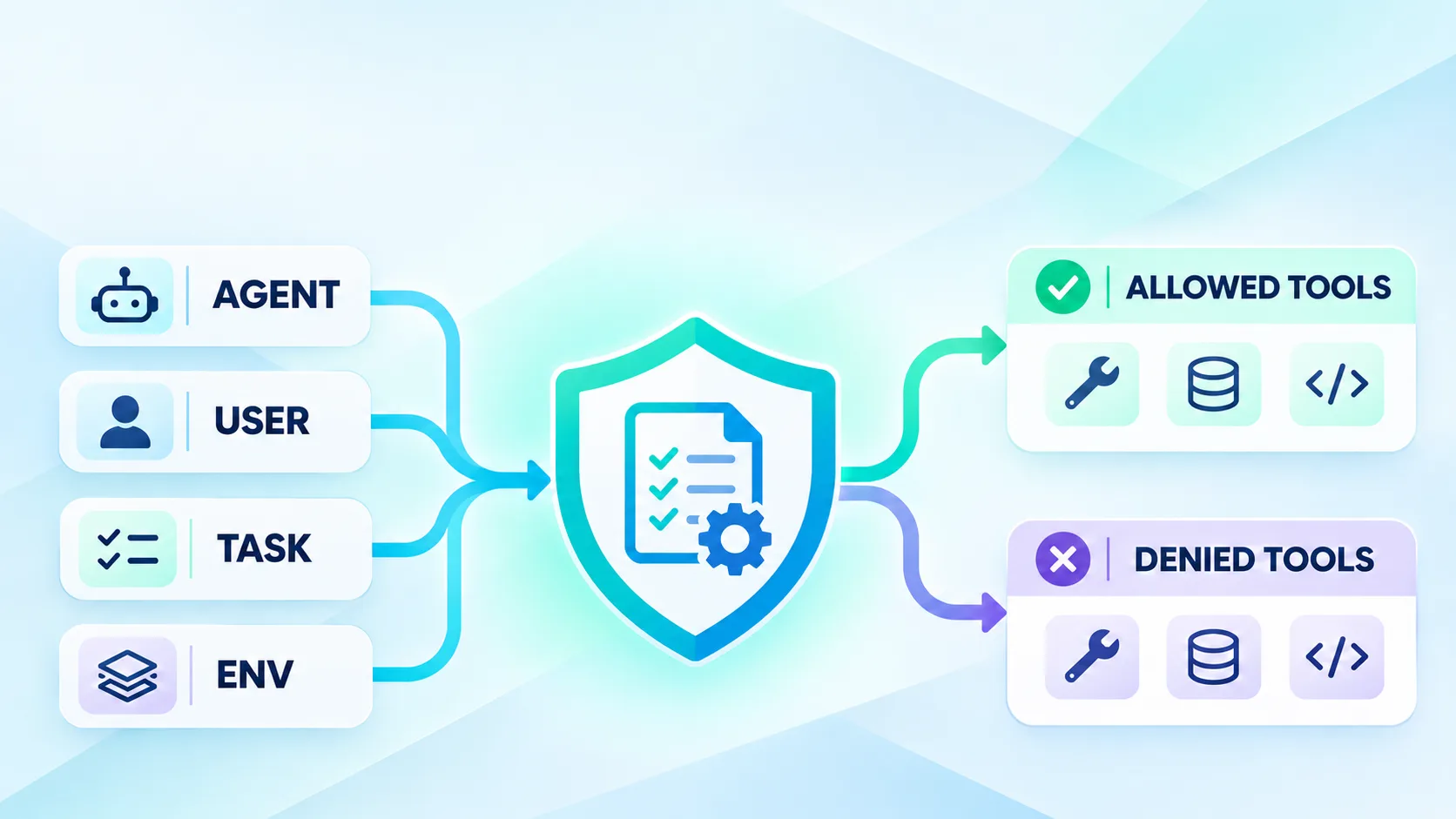
Start with four policy inputs
A useful rule needs more than the tool name. Check four facts before every call:
- Agent: Which runner or agent is asking?
- User: Who started the work, and what role do they have?
- Task: What approved job is the agent doing?
- Environment: Is the target local, test or production?
The same user may have different rights in different tasks. A developer fixing a unit test may read the repo and run tests. That does not mean the same task may change a production database.
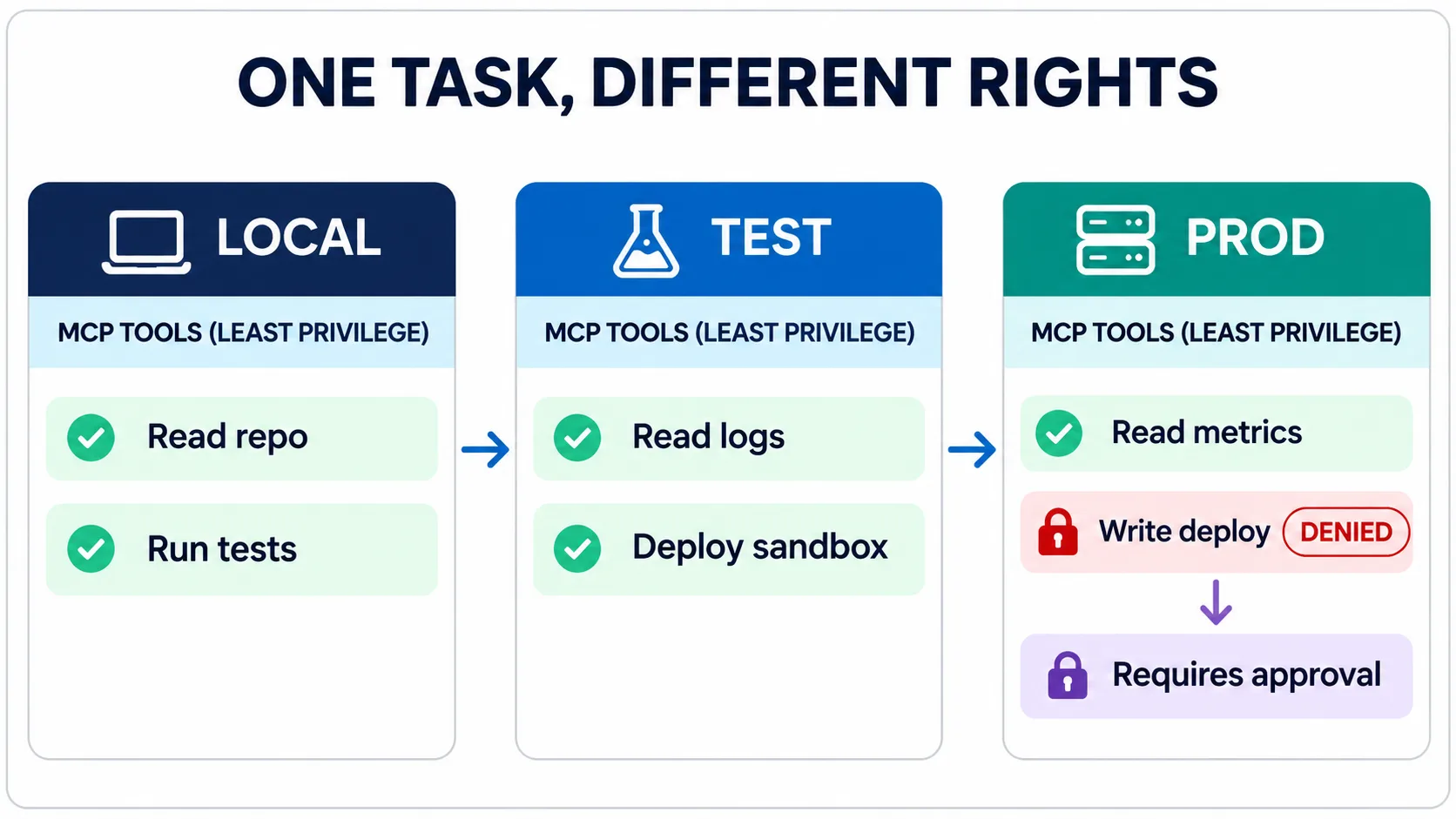
Local work can be broad but contained. Test work may write only to a sandbox. Production starts read-only, with short-lived access and a human gate for changes.
Build allow and deny rules together
policy:
  agent: reviewer
  task: check-pull-request
  environment: production
  allow: [repo.read, ci.read, metrics.read]
  deny: [repo.delete, deploy.write, secrets.read]
  approval_required: [issue.create]
Keep the default simple: if no rule matches, deny the call. Do not let the model widen its own rights. Do not pass a user’s long-lived token through the prompt or tool arguments.
The team should also keep an MCP registry with the server version, owner, tools, scopes and review date. The registry says what exists. The policy says who may use it now.
Check policy outside the model
A system prompt can remind an agent to be careful. It cannot replace authorization. A prompt-injected file, tool result or comment may tell the model to ignore a rule. The gateway must still reject a blocked call.
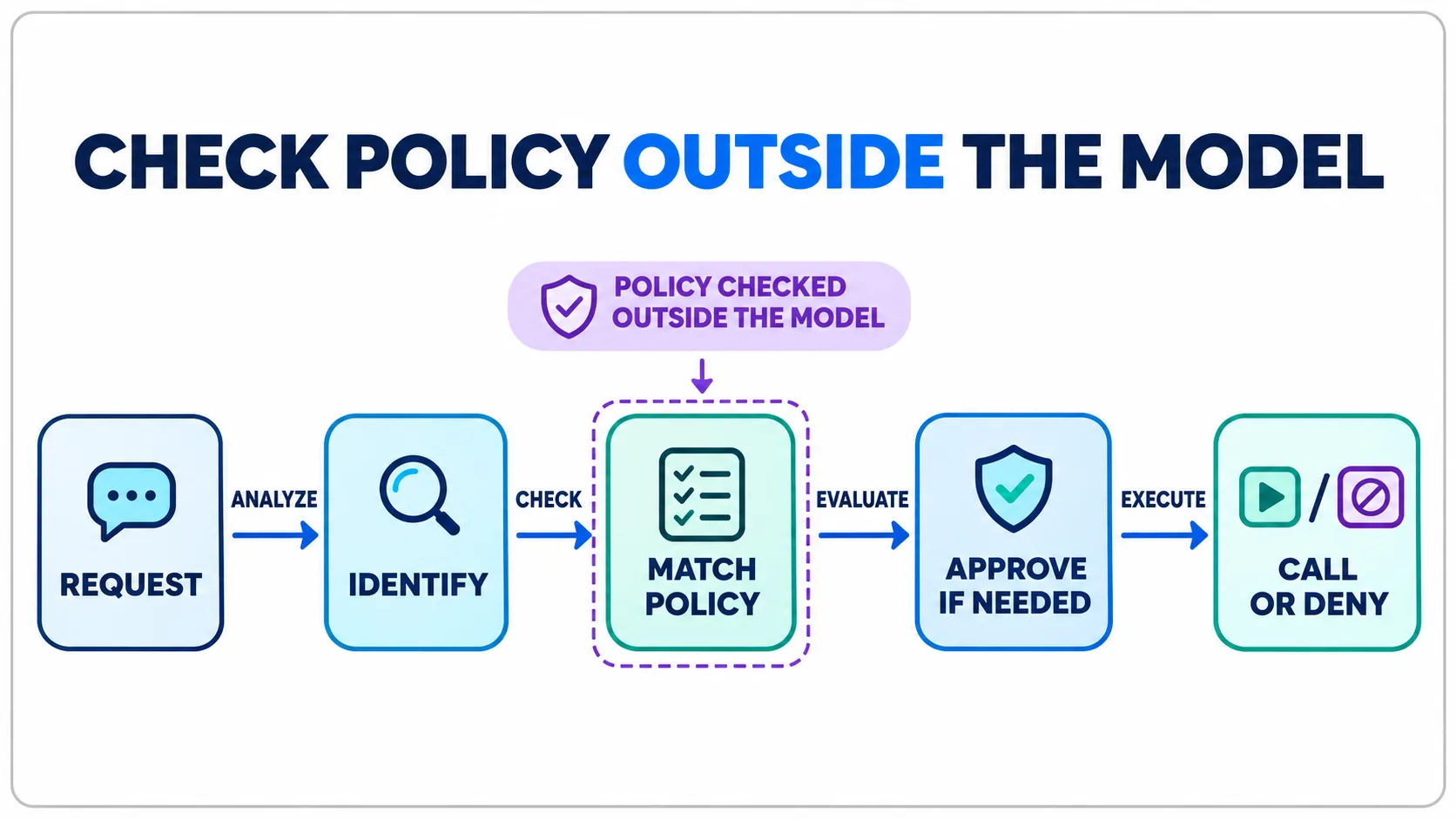
The decision path is short: identify the agent and user, match the task and environment, ask for approval when needed, then call or deny the tool. Record the policy version and decision with the tool event. For where this check sits between agents and servers, see MCP architecture for enterprise AI coding.
OWASP’s MCP security guidance also recommends least privilege per server and per tool, plus authorization in trusted application code. That keeps the final decision outside the model.
Use short-lived identity
Give each agent run its own identity. Bind it to one user, one task, one environment and a short expiry time. Do not reuse a shared admin credential across runners.
For a production action, the approval must name the exact tool and arguments. A general “user approved” flag is too loose. Consume the approval once, then require a new one for the next action.
Test the denied path
A policy is not ready until denial works. Add tests for:
- a local agent asking for a production tool;
- a reviewer asking for a deploy action;
- an expired identity;
- a missing task ID;
- changed arguments after approval;
- an unknown tool or server version.
Check the result, not only the HTTP status. The tool must not run. The audit event should show who asked, which rule matched and why the call was blocked.
Record enough evidence to explain every decision
A blocked call should be easy to explain. Store the agent ID, user ID, task ID, environment, tool name, normalized arguments, policy version and decision. For an approval, also store who approved it, what exact action was approved and when it expires.
Do not put secrets or full file contents in the audit event. Keep a safe hash or reference when the raw value is sensitive. The event should prove which rule ran without creating a second data leak.
Review denied calls as a team. A sudden rise may mean an attack, a broken agent or a rule that is too narrow. Review allowed production writes too. Sample them against the task record and confirm the arguments match the approval.
Start in report-only mode if an existing workflow has no policy layer. Log the decision without blocking for a short test period. Fix missing identities and task labels, then turn on denial for unknown tools and production writes first.
Roll out in three steps
- Start with read-only tools for local and test work.
- Add narrow write actions with exact approval gates.
- Add production access only after denied-action tests and audit review pass.
Teams can then connect more tools without handing every agent the same key. The MCP Gateway product page shows the control-plane pattern, while the guide to MCP tools explains how agents chain tool calls in real development work.
The goal is not to block useful agents. It is to give each task enough power to finish, and no more.
Frequently Asked Questions
What inputs should an MCP tool policy check?
Check the requesting agent, user, approved task and target environment before every tool call, then apply allow, deny and approval rules.
Why should MCP authorization live outside the model?
Prompt instructions can be overridden by untrusted content. Trusted policy code and the gateway must make the final authorization decision and deny unmatched calls.
How should production MCP actions be approved?
Use short-lived identity and a one-time approval bound to the exact tool and arguments. Require a new approval for the next action.
What should denied MCP calls record?
Record the agent, user, task, environment, tool, normalized arguments, policy version, matched rule and denial reason without storing secrets or sensitive file contents.
Written by
Axiom Studio