VibeFlow vs GitHub Copilot Enterprise: What Engineering Leaders Care About
A practical comparison of VibeFlow and GitHub Copilot Enterprise across governance, audit trails, review gates, SDLC ownership, metrics, rollout risk, and team controls.
 AXIOM Team July 3, 2026 13 min read
GitHub Copilot Enterprise is the default AI coding choice for many software organizations for a good reason. It lives where developers already work: the IDE, the terminal, pull requests, issues, and the GitHub codebase. For teams standardized on GitHub Enterprise, that proximity is a serious advantage.
VibeFlow starts from a different premise. It is not trying to be a better autocomplete or a better chat pane. It is the governed SDLC layer around autonomous AI work: work intake, role-separated agents, execution logs, security review, QA verification, commit evidence, and context maintenance.
That means the right question is not “which tool writes better code?” The useful question is: which part of software delivery are you trying to govern?
If the answer is “developer assistance inside GitHub,” GitHub Copilot Enterprise is the natural place to start. If the answer is “AI-generated changes must move through a reviewable, auditable delivery pipeline,” VibeFlow is built for that operating model.
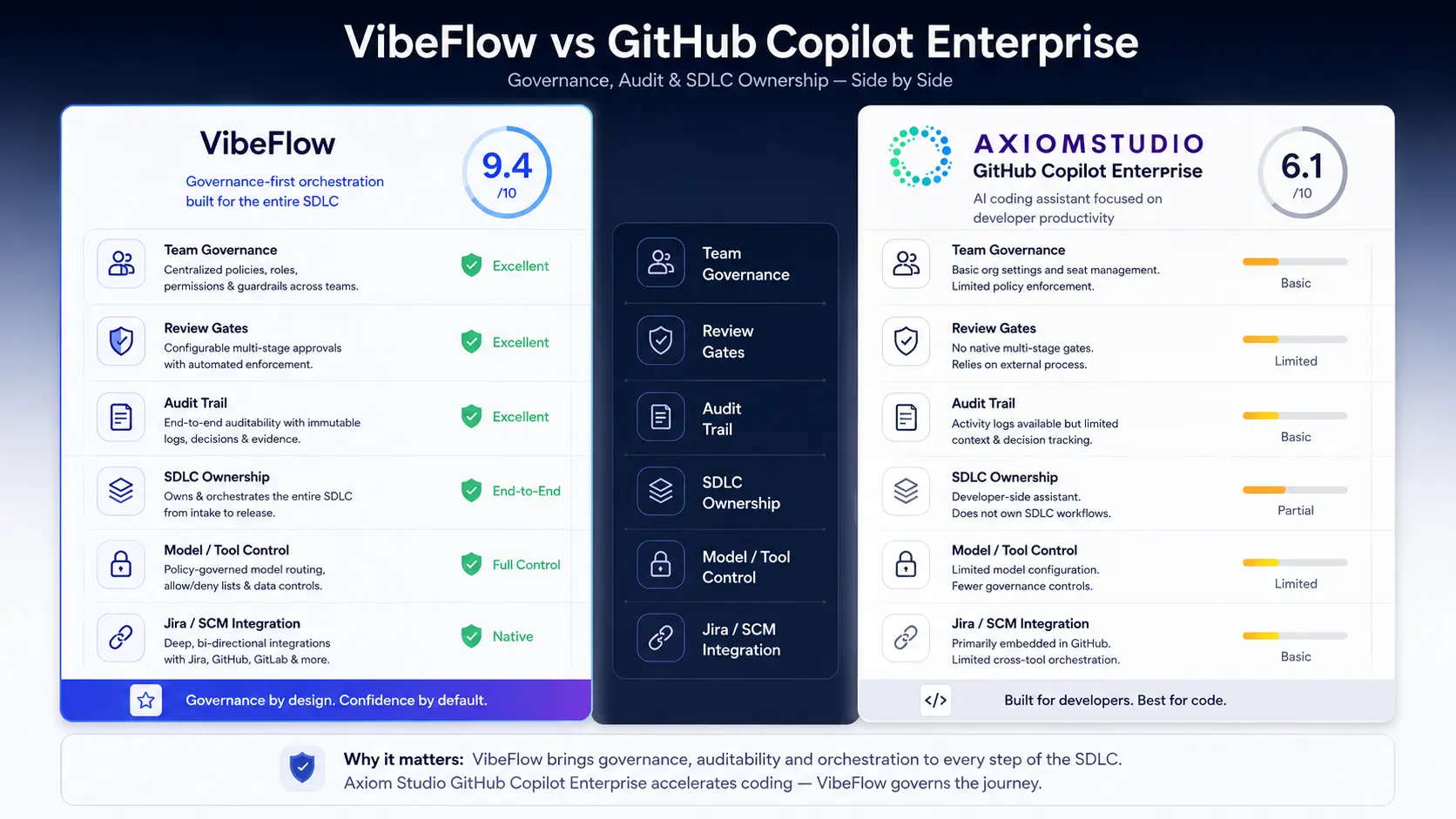
This article is the long-form version of the buyer matrix on VibeFlow vs GitHub Copilot. It focuses on the criteria engineering leaders actually have to defend: governance, auditability, workflow ownership, review gates, metrics, rollout risk, and team controls.
The Short Version
GitHub Copilot Enterprise is strongest when the buyer wants AI assistance embedded in the GitHub ecosystem. It helps developers write, understand, review, and navigate code with minimal workflow disruption. GitHub’s own documentation now spans IDE chat and completions, code review, pull request help, repository context, Copilot Spaces, coding agent workflows, and enterprise policy controls through the broader GitHub Copilot documentation.
VibeFlow is strongest when the buyer wants AI to participate in the SDLC as a governed actor, not just as a developer-side assistant. A VibeFlow item starts from a tracked work item, moves through planning and implementation, records the actual git commit, then proceeds through security and QA gates. That makes the audit trail a byproduct of the workflow instead of a manual reconstruction task.
The two products can coexist. Many enterprises will use Copilot for day-to-day developer acceleration and VibeFlow for governed autonomous delivery, compliance evidence, and cross-team orchestration.
Buyer Criteria That Matter
For an engineering leader, the comparison should be made against seven criteria:
- Where the work starts: IDE prompt, GitHub issue, Jira ticket, product requirement, or governed work queue.
- Who owns the SDLC: developer, GitHub workflow, autonomous agent, or multi-agent platform.
- What gets logged: usage metrics, PR activity, execution reasoning, diffs, review decisions, and control evidence.
- How review gates work: optional human review, CI checks, security review, QA verification, and compliance signoff.
- How teams coordinate: per-developer assistance versus shared work items and shared context.
- How governance scales: policy settings versus workflow-level enforcement.
- What the audit story is: “we can inspect GitHub activity” versus “this work item contains the chain of custody.”
Those criteria separate a developer productivity tool from a governed software delivery platform.
Where GitHub Copilot Enterprise Fits
GitHub Copilot Enterprise is best understood as a GitHub-native AI layer for developers and repositories.
Its advantages are practical:
- Low adoption friction: developers already working in GitHub and supported IDEs can use Copilot without changing the delivery process.
- Strong interactive assistance: completions, chat, code explanation, and repository-aware help support the developer while they work.
- GitHub-native surfaces: pull requests, issues, code review, repository search, and GitHub’s developer workflow are natural places for Copilot capabilities to appear.
- Centralized enterprise administration: organizations can manage access, policies, content exclusions, and usage through GitHub’s enterprise controls.
- Ecosystem gravity: GitHub Actions, code scanning, Dependabot, branch protection, and PR review already sit around the codebase.
For teams already operating inside GitHub Enterprise, this is a compelling baseline. Copilot Enterprise improves the environment the developer is already in.
The limitation is not capability. The limitation is category. Copilot Enterprise is not primarily a role-separated SDLC system of record. It does not, by itself, turn every AI-assisted change into a work item with planning evidence, implementation reasoning, commit attribution, security review, QA verification, and context updates across future agent sessions.
Your surrounding GitHub process can supply some of that. Branch protection, required checks, code owners, Actions, code scanning, and human review are all useful. The leadership question is whether you want to assemble the full governance story from those pieces, or use a platform where that story is the workflow.
Where VibeFlow Fits
VibeFlow is built around the work item rather than the editor.
A typical VibeFlow implementation flow looks like this:
- A feature todo or issue exists before code is modified.
- An agent claims the item and records the system map: files, callers, invariants, and risks.
- Implementation happens against the scoped item.
- The agent runs verification and records the evidence.
- The git commit is attached to the work item.
- Security review runs as a separate gate.
- QA verification checks the result against the original acceptance criteria.
- Project and feature context are updated so future agents inherit the decisions.
That workflow is what makes VibeFlow different from a coding assistant. It is not only helping a developer produce code. It is preserving the chain of custody around the change.
For regulated teams, this matters more than the autocomplete experience. The question after a production incident, audit request, or customer security review is rarely “which tool suggested the function?” It is “why did this change happen, who approved it, what checks ran, and where is the evidence?”
That evidence model is the core argument behind Building an AI Audit Trail and Quality Gates for AI-Generated Code. VibeFlow operationalizes that pattern.
Side-by-Side Comparison
| Criterion | GitHub Copilot Enterprise | VibeFlow |
|---|---|---|
| Primary job | Developer assistance inside GitHub and IDE workflows | Governed autonomous SDLC execution |
| Starting point | Developer prompt, IDE context, GitHub issue/PR/repo context | Tracked feature todo or issue with acceptance criteria |
| Best fit | GitHub-native teams that want low-friction AI assistance | Teams that need auditable AI delivery across roles and gates |
| Governance model | Enterprise admin policies, content exclusions, GitHub controls, surrounding CI/PR workflow | Work-item pipeline with execution logs, commit evidence, security review, QA verification, and context updates |
| Review model | Human PR review plus GitHub checks and code scanning configured by the buyer | Required status flow with separate implementation, security, and QA stages |
| Audit trail | GitHub activity, Copilot usage/admin data, PR/CI evidence, buyer-assembled control mapping | Work item chain of custody from requirement to commit to review gates |
| Team coordination | Strong inside GitHub workflows; developer-centric by default | Shared queue, shared feature context, role-separated agents, explicit handoffs |
| Non-GitHub environments | Weaker fit when Bitbucket, Jira, Confluence, or mixed repo providers are central | Designed for Jira, Confluence, GitHub, Bitbucket, Figma, and gateway-mediated agent workflows |
The most important row is the audit trail. Copilot Enterprise can be part of an auditable workflow, especially if the buyer has mature GitHub controls. VibeFlow is designed so the audit workflow is not a side project.
Governance and Policy Control
GitHub Copilot Enterprise gives admins meaningful controls inside the GitHub ecosystem. Teams can manage access, choose policy settings, configure content exclusions, and use GitHub’s surrounding controls for branch protection, code scanning, secret scanning, and PR review. For many organizations, that is a major step up from unmanaged AI use.
VibeFlow’s governance sits one level higher. It governs the delivery process, not only the assistant. The platform can require a work item before implementation, keep agent execution logs, capture commit metadata, enforce review queues, and maintain context between sessions. It treats “AI wrote this” as an operational event that needs evidence.
That distinction matters when AI adoption spreads beyond one editor or one repo provider. A team may use GitHub Copilot, Cursor, Claude Code, local agents, hosted agents, and model gateways at the same time. A GitHub-native control plane governs the GitHub slice. A platform-level governance layer governs the work.
For a deeper version of that problem, see Why Enterprise Teams Outgrow Cursor and Devin and From Cursor to Copilot.
Auditability and Evidence
Auditability is where the comparison becomes sharp.
With Copilot Enterprise, evidence typically comes from several places:
- GitHub pull request history
- Commit history
- Branch protection and required checks
- Code review records
- GitHub Actions output
- Code scanning and secret scanning findings
- Copilot usage/admin reporting
That can be a strong evidence set. But it is assembled from GitHub activity and the buyer’s configured process.
With VibeFlow, the evidence is centered on the work item:
- The original request and acceptance criteria
- The agent that claimed the item
- Planning notes and blast-radius map
- Implementation log and verification output
- Git commit hash and line counts
- Security review result
- QA verification result
- Feature context updates for future work
That difference is not cosmetic. In an audit or incident review, “show me the work item” is faster and less ambiguous than “open the PR, then the CI job, then the code scan, then the Jira ticket, then the chat thread.”
This is why compliance-focused teams should read Compliance, Governance, and Review Gates before treating any AI coding assistant as a complete governance answer.
Review Gates and SDLC Coverage
Copilot Enterprise improves the developer’s ability to write and review code. GitHub also provides strong surrounding workflow primitives: PRs, code owners, required reviews, Actions, code scanning, and repository rules. If your engineering organization has already built a disciplined GitHub delivery pipeline, Copilot fits neatly into it.
VibeFlow owns more of the SDLC path directly. Planning, implementation, commit tracking, security review, QA verification, and context maintenance are first-class stages. That makes the platform opinionated, but it also reduces the number of places where governance can fall through a gap.
The trade-off is simple:
- Choose Copilot Enterprise when you want AI inside an already-mature GitHub workflow.
- Choose VibeFlow when you want the AI workflow itself to enforce the delivery process.
For engineering leaders, the choice often depends on the maturity of the existing gates. If your current PR process already catches security, coverage, compliance, and review evidence reliably, Copilot Enterprise can ride that process. If those gates are inconsistent or spread across teams, VibeFlow gives you a stricter operating model.
Metrics and Operating Visibility
GitHub Copilot Enterprise gives leadership visibility into adoption and usage inside the GitHub/Copilot surface. That is useful for rollout management: who has access, how adoption is trending, and how Copilot is being used.
VibeFlow metrics are oriented around delivery outcomes:
- Work items claimed and completed
- Agent sessions and personas involved
- Commits attached to work
- Lines changed
- Time in planning, implementation, security review, and QA
- Feature-level work summaries
- Review pass/fail status
- Context debt after completed batches
That is the difference between AI tool adoption metrics and AI delivery metrics. Both matter. A CTO deciding whether the investment is working needs both the usage view and the delivery evidence view.
Rollout Risk
Copilot Enterprise usually has lower rollout friction because it fits into existing developer habits. That is valuable. The first wave of AI adoption fails when tools are too far from the work developers already do.
But low rollout friction can hide organizational risk. If every developer uses AI inside their editor and the only governing layer is informal guidance, the team may not notice missing evidence until a customer security review, audit, or incident.
VibeFlow has more process surface area because it changes how work moves. That is a rollout cost. It also makes the control points visible from day one. Work must be tracked. Agents must log. Reviews must happen. Commits must attach to work items.
The practical rollout pattern is often:
- Keep Copilot Enterprise for developer-level acceleration.
- Introduce VibeFlow for governed autonomous work and high-risk changes.
- Route compliance-sensitive features through VibeFlow first.
- Expand the workflow as teams get comfortable with the evidence model.
This avoids a false either-or decision and gives the organization a governed path for the work that needs it most.
When to Choose GitHub Copilot Enterprise
Choose GitHub Copilot Enterprise when:
- Your source-control and review process is standardized on GitHub.
- You want rapid AI adoption with minimal process change.
- The primary goal is developer assistance: completions, chat, code explanation, PR help, and GitHub-native productivity.
- Your existing GitHub governance, CI, and review gates are already mature.
- You are not trying to replace the SDLC system of record.
In that shape, Copilot Enterprise is a strong default. It makes developers faster without asking the organization to redesign delivery.
When to Choose VibeFlow
Choose VibeFlow when:
- AI-generated code must be tied to tracked requirements.
- Security review and QA verification need to be required workflow stages.
- The organization needs a work-item-centered audit trail.
- Multiple agents, tools, or model providers are already in use.
- Jira, Confluence, Bitbucket, Figma, or non-GitHub context is part of the real delivery process.
- Leadership needs delivery metrics, not only AI tool usage metrics.
- Compliance posture matters as much as developer velocity.
This is the environment where VibeFlow’s stricter process becomes an advantage rather than overhead.
The Bottom Line
GitHub Copilot Enterprise is a strong AI assistant for organizations living in GitHub. VibeFlow is a governed AI software delivery platform for organizations that need work items, agents, reviews, commits, and audit evidence in one chain.
The mistake is comparing them as if they occupy the same layer. They do not.
Copilot Enterprise helps developers work faster inside the GitHub ecosystem. VibeFlow helps organizations govern AI work across the SDLC. Mature teams may use both: Copilot for interactive development, VibeFlow for autonomous delivery and evidence.
If your evaluation is about developer adoption, start with Copilot Enterprise. If your evaluation is about whether AI-generated work can survive a security review, audit, or executive operating review, explore VibeFlow and request a demo around your actual SDLC.
Related Reading
- VibeFlow vs GitHub Copilot: the concise comparison matrix.
- Building an AI Audit Trail: what evidence every AI-assisted change should capture.
- Quality Gates for AI-Generated Code: how review gates turn AI output into defensible changes.
- From Individual Copilots to Team-Wide AI Orchestration: the maturity curve from assistant adoption to governed multi-agent delivery.
- GitHub Copilot documentation: official GitHub reference for current Copilot capabilities and plans.
Written by
AXIOM Team