SOC 2 Compliance Automation: What It Covers and How to Start
SOC 2 and HIPAA compliance automation explained for security, compliance and engineering teams: what to automate, what stays human, and how to get audit-ready.
 Axiom Studio November 15, 2026 14 min read
On this page
SOC 2 compliance automation replaces spreadsheets and screenshot hunts with software that collects evidence from your systems continuously, flags control gaps as they appear and keeps an audit trail ready for your examiner. It works best when the audit trail is built into the systems where work happens, including the AI tools your developers and agents now use. That is how Axiom Studio approaches it: our platform records every AI action in real time, so audit evidence is a by-product of normal work and not a quarterly project.
This guide is for compliance, security and engineering leaders at mid-size and large organizations. It explains what SOC 2 asks for, which tasks automation takes over, how HIPAA fits in, and how to get from zero to audit-ready.
TL;DR
- SOC 2 is an attestation by an independent CPA firm, not a certification. A Type 2 report covers how your controls operated over a period, so evidence must be continuous.
- Automation is strongest at evidence collection, configuration monitoring, policy workflows and audit-trail generation. Judgment calls such as scoping, risk decisions and log review stay with your people.
- HIPAA also requires activity logging and regular review of system activity, which makes the same automated audit trail useful for both frameworks.
- AI systems are the new gap: models, agents and tool calls need the same logging, access control and cost tracking as any other in-scope system.
- Start by scoping, mapping controls to systems, connecting them, then fixing gaps before the observation window opens.
What SOC 2 actually asks of you
SOC 2 reports are built on the American Institute of Certified Public Accountants (AICPA) Trust Services Criteria. They cover five categories: security, availability, processing integrity, confidentiality and privacy. Security is in scope for every SOC 2 examination; the other four are added when they matter to the service you provide. Our SOC 2 compliance overview maps these criteria to AI development controls.
The difference between report types decides how much automation helps you:
- Type 1 describes whether your controls are suitably designed at a point in time.
- Type 2 goes further. According to the AICPA’s Trust Services Criteria, it covers design and operating effectiveness over a specified period and includes a detailed description of the auditor’s tests of controls. A Type 1 report contains no opinion on operating effectiveness.
Because Type 2 is about behavior over time, a folder of screenshots taken the week before the audit proves little. What the auditor wants is proof that access reviews, change approvals, vulnerability scans and incident handling happened, on schedule, throughout the window. That is exactly the kind of recurring, timestamped evidence software is good at producing.
SOC 2 is also an attestation, not a certificate. Nobody “passes” in the way you pass an exam: the auditor issues an opinion on your controls, and your customers read the report. That is why customers’ security questionnaires so often ask for the latest Type 2 report, and why a lapse in evidence is costly.
What compliance automation does
Compliance automation is software that reduces the manual work of preparing for and maintaining a SOC 2 examination. In practice, it does five jobs.
Collects evidence from connected systems
Integrations with cloud accounts, identity providers, code repositories and ticketing tools pull configuration states and activity records on a schedule. According to Schneider Downs, a CPA and advisory firm, platforms can centralize artifacts and automate collection from integrated systems, which reduces administrative effort and improves consistency from one audit cycle to the next.
Monitors controls continuously
Instead of checking that multi-factor authentication is on once a year, monitoring checks it daily and alerts someone when a new account appears without it. Drift is caught in days, not at audit time.
Runs policy and workflow tasks
Policy acknowledgments, access-review reminders, onboarding and offboarding checklists and risk-register updates become assigned tasks with owners and due dates. The record of completion is the evidence.
Maps one control to many frameworks
A single control, such as logging administrator actions, can support SOC 2, ISO 27001 and HIPAA. Mapping it once means one piece of evidence serves several audits.
Packages the audit
Auditors receive organized, time-stamped evidence and a consistent trail, which shortens the back-and-forth of sample requests.
What stays with your people
No single tool automates SOC 2 end to end. Sensiba, a CPA and advisory firm, makes the same point in Why You Can’t Fully Automate SOC 2 Compliance. Monitoring, configuration management, document generation and governance-risk-compliance (GRC) tools each speed up part of the work, but logs still have to be reviewed and policies kept current, whatever software is installed.
The practical split looks like this:
| Task | Automation handles | Your team decides |
|---|---|---|
| Scoping | Inventory of connected systems | Which systems and categories are in scope |
| Evidence | Collection, timestamps, storage | Whether evidence covers the whole in-scope population |
| Monitoring | Alerts on drift and failures | Who responds, how fast, and what counts as an exception |
| Policies | Distribution, acknowledgments, reminders | What the policy says and whether it matches reality |
| Logs | Capture and retention | Regular review and follow-up |
| Audit | Organized evidence packages | Management’s assertions and answers to the auditor |
The second column is where the time savings are. The third is where compliance leaders earn their pay. Schneider Downs also notes that integrations can capture only partial or point-in-time data, while Type 2 evidence has to show operation over time and across everything in scope. When you pick a tool, ask whether it records activity continuously, not just snapshots.
Where AI systems change the SOC 2 picture
Most SOC 2 automation guides were written for a world of servers, laptops and SaaS apps. Your environment now also includes large language models, coding assistants and autonomous agents that read data, call tools and change code. Auditors will ask the same questions about them that they ask about any system: who can use it, what did it do, who approved the change, and where is the record?
That creates concrete gaps:
- Access: which people and agents can reach which models, tools and data?
- Change management: when an agent opens or merges a pull request, is there an approval trail?
- Logging: can you reconstruct every model call and tool call during the observation window?
- Confidentiality: does sensitive data leave through prompts, and do you route it to approved providers only?
- Cost and usage: can you attribute usage to teams and projects?
This is the part Axiom Studio is built for. Our platform unifies models, tools and agent interactions under one Kubernetes-native layer with policy-based access controls, real-time audit trails and cost tracking. Our design target is 100% audit trail coverage of AI activity, so the evidence an auditor samples for your AI systems already exists, in one place, with timestamps. For a deeper look at how AI fits into regulatory frameworks, see our guide to AI compliance for SOC 2, HIPAA and the EU AI Act.
HIPAA compliance automation
If you handle protected health information, the same automation logic applies, with different rules behind it. HIPAA’s Security Rule applies to covered entities (health plans, clearinghouses and providers that transmit health information electronically) and to their business associates, the vendors that handle that data for them, as described in HHS’s Security Rule summary.
The same HHS summary says a regulated entity must:
- regularly review records to track access to electronic protected health information (ePHI) and detect security incidents;
- periodically evaluate and modify its security measures;
- regularly reevaluate risks to ePHI;
- implement hardware, software or procedural mechanisms that record and examine activity in systems containing or using ePHI.
That last item is an audit-controls requirement, and it is a natural fit for automation. HHS’s audit protocol lists, among other things, procedures to regularly review information system activity such as audit logs, access reports and incident tracking, and evidence such as sampled review instances and screenshots of settings like automatic logoff.
What this means in practice:
- Automate log capture, retention, access reports and alerting on unusual access to systems that touch ePHI.
- Keep human the risk analysis, the decision about what to do with each finding, workforce training and business associate agreements.
- Watch AI workflows closely. If an assistant or agent can see ePHI, its prompts, responses and tool calls are activity in a system using ePHI, and they belong in your audit trail. Our HIPAA compliance page covers how these safeguards apply to AI-assisted development.
For the rule’s future, HHS proposed a major update to the Security Rule in a January 2025 notice of proposed rulemaking. A proposal is not a final rule, so check HHS’s page for the current status. Building continuous logging and regular risk review now is sound under today’s rule whichever way the final text lands. Your counsel or privacy officer should confirm how any change applies to your organization.
How to implement SOC 2 automation, step by step
1. Define scope and categories
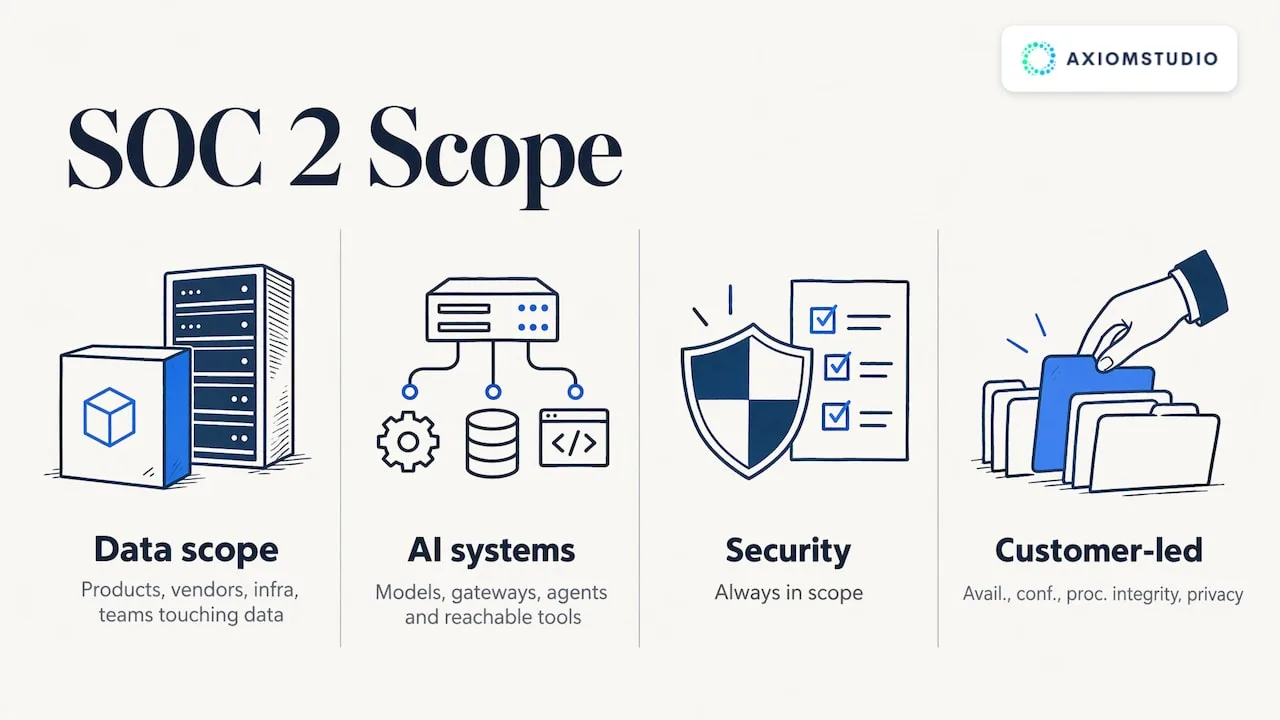
List the products, infrastructure, vendors and teams that touch customer data. Security is always in scope; add availability, confidentiality, processing integrity or privacy only where customer commitments call for them. Include AI systems explicitly: models, gateways, agents and the tools they can reach.
Where it goes wrong: leaving shadow AI tools out of scope because nobody inventoried them. Routing model access through a single gateway gives you a defined perimeter. Our LLM Gateway routes across multiple providers under one policy layer, so the inventory of model usage is built in.
2. Map controls to systems and owners
For each criterion, name the control, the system that proves it and the person accountable. A short table beats a long policy binder. Most tools ship with prebuilt control sets; adapt them to how you actually work instead of adopting wording you do not follow.
3. Connect your systems
Integrate identity, cloud, source control, ticketing, endpoint and HR systems. Check that each integration collects continuously across the full population, not only a sample or a snapshot. For AI activity, Axiom Studio runs Kubernetes-native with GitOps workflows, so agent and model activity lands in the same trail as the rest of your engineering work.
4. Run a gap assessment and fix findings
Let the platform test every control, then triage failures by risk. Typical early findings are accounts without multi-factor authentication, stale access, missing approvals on code changes and policies nobody has acknowledged. Fix them before your observation window opens, because failures inside the window become exceptions in the report.
5. Choose Type 1 or go straight to Type 2
A Type 1 report can be a quick first proof for customers who need something now. Many teams then move to Type 2 because that is what enterprise buyers usually ask for. Observation periods for first Type 2 reports vary by auditor and by readiness, so agree the window with your CPA firm early.
6. Assign review rhythms
Automation raises alerts; people close them. Set a weekly alert review, a monthly access review and a quarterly management review, and record each one as a task. Regular log review is a stated expectation under HIPAA and a common auditor test under SOC 2, so the review itself must leave a record.
7. Prepare for the audit
Agree the sample populations and evidence formats with your auditor. Run a pre-audit check on the evidence: is it complete, representative of the whole in-scope population and appropriate to the control? Software can package the evidence, but a person has to judge whether it answers the control.
8. Keep the program running
After the report, the window starts again. Continuous monitoring is the payoff here: new engineers, new tools and new AI agents join your environment every month, and each must inherit the same controls.
How to evaluate SOC 2 automation software
Use criteria that reflect how your audit will actually be tested:
| Criterion | Question to ask |
|---|---|
| Continuous evidence | Does it record activity over time or only capture snapshots? |
| Coverage | Does it reach your cloud, identity, code and AI systems? |
| Framework mapping | Can one control serve SOC 2, HIPAA, ISO 27001, GDPR or FedRAMP? |
| Access control | Can policies govern people, models, tools and agents? |
| Audit trail | Is every action attributable, timestamped and retained? |
| Cost visibility | Can you attribute usage and spend to teams? |
| Workflow | Do findings become owned tasks with due dates? |
Axiom Studio covers frameworks including SOC 2, HIPAA, ISO 27001, GDPR and FedRAMP, and pairs policy-based access controls with real-time audit trails and cost tracking. If your engineers build with AI coding tools, our AI coding compliance and GRC page shows how review gates and traceability work in VibeFlow, and our comparison of governance and review gates across AI development tools goes deeper.
If you are weighing a platform against writing your own policies, our piece on an AI governance platform versus DIY policies lays out the trade-offs.
Putting Axiom Studio to work on your audit trail
Axiom Studio is a unified platform for AI governance, observability and compliance automation. It gives your compliance team real-time visibility into what AI systems and agents do, and gives your developers a governed way to keep working with AI. We design it to cut time-to-production by up to 25x while keeping every action in the audit trail.
The plans are published on our pricing page: FREE, Pro at $20 per month, Team at $49 per seat per month with a minimum seat count, and Enterprise, which has no published price. For a walkthrough aimed at your frameworks and your auditors, you can request a demo.
Common mistakes to avoid
- Treating the tool as the program. Software collects and organizes. Ownership, review and remediation stay with named people.
- Starting the observation window too early. Open it only when controls pass consistently.
- Ignoring AI activity. Put AI systems in your system description, and have the logs ready when the auditor asks about them.
- Collecting everything, reviewing nothing. More evidence is not better evidence. Tie each artifact to a control.
- Treating HIPAA as an afterthought. If ePHI is in scope, plan for audit controls, access review and risk analysis alongside SOC 2 from day one.
Sources
- 2017 Trust Services Criteria for Security, Availability, Processing Integrity, Confidentiality, and Privacy (AICPA)
- SOC 2 Trust Services Criteria guide
- Why You Can’t Fully Automate SOC 2 Compliance (Sensiba)
- What Compliance Automation Can’t Tell You (Schneider Downs)
- Summary of the HIPAA Security Rule (HHS)
- HIPAA audit protocol (HHS)
- HIPAA Security Rule notice of proposed rulemaking (Federal Register)
Recommended
- AI Compliance: EU AI Act, SOC 2, HIPAA & Emerging Regulations Guide
- What is Compliance? Regulatory Frameworks & AI Compliance Guide
Frequently Asked Questions
Can SOC 2 compliance be automated?
A large share of the work can: evidence collection, continuous monitoring, policy workflows, control mapping and audit packaging. Your team still scopes the audit, reviews logs, decides on risks and answers the auditor. The best results come from automating the recurring tasks and giving the judgment calls clear owners.
What is the difference between SOC 2 Type 1 and Type 2?
Type 1 reports on whether controls are suitably designed at one point in time. Type 2 also reports on whether they operated effectively over a period and describes the auditor's tests. Because Type 2 depends on evidence over time, it benefits most from continuous automation.
Does HIPAA compliance automation make us HIPAA compliant?
No software does that on its own. HIPAA requires activity logging, regular review of system activity, ongoing risk evaluation and more, so automation covers the capture and reporting while your team performs the analysis and review. Talk to your privacy officer or healthcare counsel about your specific obligations.
Do AI tools and agents need to be in scope for SOC 2?
If they can access, process or change in-scope systems or data, yes, they belong in your system description and your controls. Access policies, change approvals and complete logs of model and tool calls give your auditor the same assurance they expect for any other system.
Written by
Axiom Studio