What is MCP? How LLMs Use the Model Context Protocol
A technical deep dive into the Model Context Protocol — the open standard that lets LLMs discover and invoke tools. Learn the architecture, JSON-RPC transport, and the exact tool-call loop that powers AI agents.
 AXIOM Team April 4, 2026 12 min read
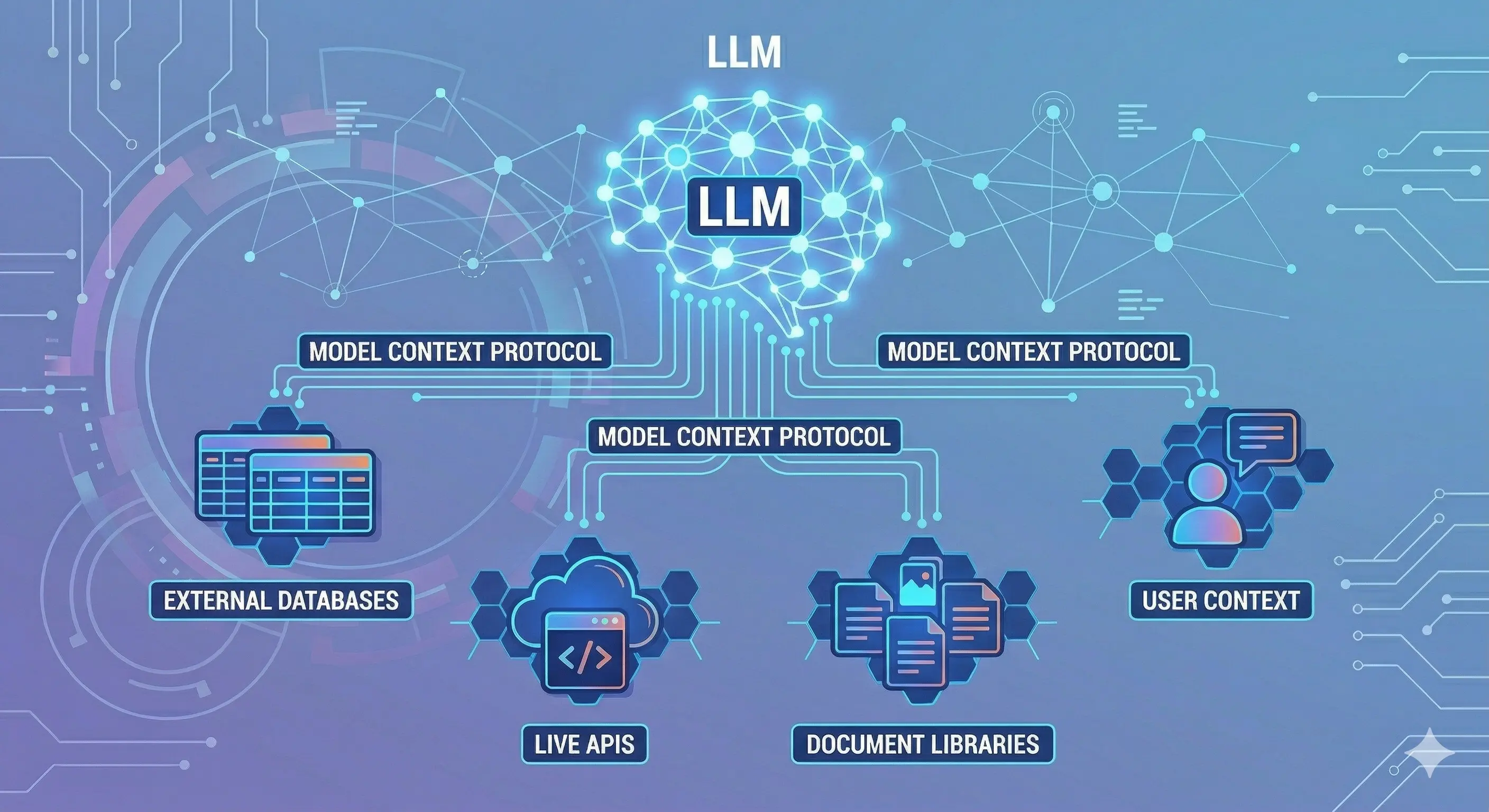
Large language models are, at their core, text-in text-out systems. Yet modern AI agents read files, query databases, execute code, and push commits. The bridge between a text-prediction model and these real-world capabilities is the Model Context Protocol (MCP).
This article explains what MCP is, how it works under the hood, and exactly how an LLM uses it to invoke tools.
[IMAGE: High-level diagram: LLM ↔ MCP Client ↔ MCP Server ↔ external tool/data source]
Background: The Tool-Calling Problem
Before MCP, every AI application that needed external capabilities had to invent its own integration layer. OpenAI introduced function calling in 2023, allowing models to emit structured JSON that calling code could route to functions. Anthropic added tool use shortly after. Both approaches work — but they solve only the protocol between model and application code, not the protocol between application code and external systems.
The result: every agent application contained bespoke glue code to connect tool calls to the actual systems they targeted. Tooling was non-reusable and non-discoverable across agents.
MCP was designed to solve this. Anthropic released MCP in November 2024 as an open specification under the MIT license, with SDKs for TypeScript, Python, Java, Kotlin, C#, and Go. It has since been adopted by Cursor, Zed, Replit, Codeium, and dozens of enterprise tools.
The Three-Layer Architecture: Host, Client, Server
MCP introduces three distinct roles:
[IMAGE: Layered architecture diagram — Host containing MCP Client(s), connecting to multiple MCP Servers]
MCP Host
The host is the application the user interacts with — Claude Desktop, Cursor, a custom AI agent application. The host is responsible for:
- Managing user sessions and conversation context
- Instantiating one or more MCP clients
- Deciding which servers to connect to and when
- Routing LLM tool call requests to the appropriate client
A single host can maintain connections to multiple MCP servers simultaneously. Claude Desktop, for example, can connect to a filesystem server, a GitHub server, and a database server at the same time — each connection managed by a separate client instance within the host.
MCP Client
The client lives inside the host and manages a 1:1 connection to a single MCP server. Its responsibilities:
- Establishing and maintaining the transport connection (stdio or HTTP+SSE)
- Performing the initialization handshake
- Sending requests and receiving responses per the JSON-RPC 2.0 protocol
- Maintaining the negotiated capability set for the connection
Clients are thin — they don’t make decisions about when to call tools. That logic lives in the host, which decides based on the LLM’s output.
MCP Server
The server is a standalone process that exposes capabilities. Each server declares a set of tools, resources, and prompts. Servers are:
- Isolated: Each server runs as its own process, scoped to a specific domain (filesystem, GitHub, Postgres, Slack, etc.)
- Stateless or stateful: Most servers are stateless per request; some maintain session state for multi-step operations
- Independently deployable: A server can run locally (stdio) or remotely (HTTP+SSE), allowing the same server to be shared across multiple hosts
The official MCP Servers repository lists reference implementations for filesystem, Git, GitHub, Google Drive, Postgres, Slack, Puppeteer, and dozens more.
The Three Capability Types
MCP servers expose three types of capabilities:
Tools
Tools are actions — callable functions the LLM can invoke to affect the world or retrieve information. Each tool is described by:
- A name (e.g.,
read_file,create_pull_request) - A description in natural language that helps the LLM understand when and how to use it
- An input schema in JSON Schema format defining required and optional parameters
- An optional output schema
{
  "name": "read_file",
  "description": "Read the complete contents of a file from the filesystem. Use this when you need to examine source code, configuration files, or any text content. Returns the file contents as a string.",
  "inputSchema": {
    "type": "object",
    "properties": {
      "path": {
        "type": "string",
        "description": "Absolute or relative path to the file"
      }
    },
    "required": ["path"]
  }
}
The description is critical — it is injected directly into the LLM’s context and is what the model reads to decide whether and how to invoke the tool. Well-written descriptions dramatically improve tool selection accuracy.
Resources
Resources are data sources — content the LLM can read to build understanding without taking action. A resource might be:
- A file or directory listing
- A database row or query result
- A live API endpoint response
- An in-memory state snapshot
Resources are identified by URI (e.g., file:///path/to/file, postgres://host/db/table). They differ from tools in that they are read-only by convention — tools are the action mechanism, resources are the context mechanism.
Prompts
Prompts are reusable templates — structured starting points that the host can inject into LLM context. An MCP server might expose a code_review prompt that provides a standardized framework for reviewing a diff, or a debug_session prompt that structures a debugging workflow. Prompts allow server authors to encode expertise directly into the protocol.
Transport: How Messages Move
MCP supports two transport mechanisms:
stdio Transport
In stdio transport, the MCP server is a subprocess. The host spawns it and communicates via stdin/stdout. Each message is a newline-delimited JSON-RPC object.
Host Process
    └── spawns → MCP Server Process
                     stdin  ← JSON-RPC requests
                     stdout → JSON-RPC responses
stdio is the most common transport for local development and desktop applications. Claude Desktop and most current MCP integrations use stdio. It’s simple, secure (no network exposure), and requires no server infrastructure.
HTTP + SSE Transport
In HTTP+SSE transport, the MCP server is a long-running HTTP service. The client sends requests as HTTP POST requests and receives responses (and server-initiated messages) via Server-Sent Events. This transport is used when:
- The server needs to be shared across multiple hosts
- The server is remote (cloud-hosted)
- The server needs to push notifications to the client
The MCP specification documents both transports in detail.
The Initialization Handshake
Before any tool calls, client and server exchange a capability negotiation:
Client → Server: initialize
  {
    "jsonrpc": "2.0",
    "id": 1,
    "method": "initialize",
    "params": {
      "protocolVersion": "2024-11-05",
      "capabilities": { "roots": { "listChanged": true } },
      "clientInfo": { "name": "claude-desktop", "version": "1.0.0" }
    }
  }

Server → Client: result
  {
    "jsonrpc": "2.0",
    "id": 1,
    "result": {
      "protocolVersion": "2024-11-05",
      "capabilities": {
        "tools": { "listChanged": true },
        "resources": { "listChanged": true }
      },
      "serverInfo": { "name": "filesystem", "version": "0.6.2" }
    }
  }

Client → Server: notifications/initialized
After this handshake, the client fetches the server’s tool list:
Client → Server: tools/list
Server → Client: { "tools": [ { "name": "read_file", ... }, ... ] }
The full list of available tools is then passed to the LLM in its system prompt or tool definitions block, depending on the host implementation.
[IMAGE: Sequence diagram — initialization handshake and tool list fetch]
The LLM Tool-Call Loop
This is the core of how an LLM uses MCP at runtime. The loop has four phases:
[IMAGE: Tool-call loop diagram — LLM generates call → Host routes → Server executes → result injected back into context]
Phase 1: Tool Definition Injection
When the host builds the LLM request, it includes the tool schemas from all connected MCP servers in the tools field (Anthropic API) or equivalent. For Claude, this looks like:
response = anthropic.messages.create(
    model="claude-opus-4-6",
    max_tokens=4096,
    tools=[
        {
            "name": "read_file",
            "description": "Read the complete contents of a file...",
            "input_schema": {
                "type": "object",
                "properties": { "path": { "type": "string" } },
                "required": ["path"]
            }
        },
        # ... more tools from connected servers
    ],
    messages=[{ "role": "user", "content": "What does the config.py file contain?" }]
)
The model sees these tool definitions and can choose to invoke any of them.
Phase 2: LLM Generates a Tool Call
When the model decides to use a tool, it returns a tool_use content block instead of (or alongside) text:
{
  "role": "assistant",
  "content": [
    {
      "type": "tool_use",
      "id": "toolu_01XjY9abc",
      "name": "read_file",
      "input": { "path": "config.py" }
    }
  ],
  "stop_reason": "tool_use"
}
The stop_reason: "tool_use" signals the host that it must execute the tool before continuing the conversation. The model has paused — waiting for the result.
Phase 3: Host Routes to MCP Client → Server
The host receives the tool use block, looks up which MCP server registered the read_file tool, and sends the request through the client:
{
  "jsonrpc": "2.0",
  "id": 42,
  "method": "tools/call",
  "params": {
    "name": "read_file",
    "arguments": { "path": "config.py" }
  }
}
The MCP server executes the tool and returns:
{
  "jsonrpc": "2.0",
  "id": 42,
  "result": {
    "content": [
      {
        "type": "text",
        "text": "DATABASE_URL=postgres://localhost/app\nDEBUG=true\nSECRET_KEY=..."
      }
    ],
    "isError": false
  }
}
Phase 4: Result Injected, Loop Continues
The host injects the tool result back into the conversation as a tool_result message:
{
  "role": "user",
  "content": [
    {
      "type": "tool_result",
      "tool_use_id": "toolu_01XjY9abc",
      "content": "DATABASE_URL=postgres://localhost/app\nDEBUG=true\nSECRET_KEY=..."
    }
  ]
}
The full conversation — including the tool call and result — is sent back to the LLM, which now has the file contents in context and can continue reasoning and responding. This loop repeats for each tool the model decides to invoke.
A Complete Real-World Example
Here’s the full sequence for “What tests are failing in my repo?” using a Git MCP server:
- User prompt: “What tests are failing in my repo?”
- LLM → tool call:
run_command({ "command": "npm test -- --json" }) - MCP server executes
npm testin the repo directory, captures stdout - Result injected: JSON test output with 3 failing tests
- LLM → tool call:
read_file({ "path": "src/auth/login.test.ts" })— reads the failing test - Result injected: test file contents
- LLM → tool call:
read_file({ "path": "src/auth/login.ts" })— reads the implementation - Result injected: implementation contents
- LLM generates answer: “Three tests are failing in
login.test.ts. TheverifyTokenfunction is checkingexpbeforeiat, but the JWT library returns them in the opposite order. Here’s the fix…”
Nine exchanges, three MCP tool calls, all orchestrated through the loop above. The LLM never had direct file system or process access — the MCP server mediated every interaction.
[IMAGE: End-to-end sequence diagram for the failing tests example]
Tool Discovery at Scale
In production agent systems, a host may connect to dozens of MCP servers, resulting in hundreds of available tools. This creates a challenge: injecting 200 tool schemas into every LLM request is expensive (tokens) and degrades model performance (too many choices).
Production systems address this with tool filtering — the host selects a relevant subset of tools based on the current task context before building the LLM request. Some approaches:
- Static scoping: Different agents get different server subsets (a coding agent gets filesystem + git, not Slack + calendar)
- Dynamic filtering: The host uses semantic search over tool descriptions to find tools relevant to the current message
- Tool namespacing: Grouping tools by server name (
github.create_prvsjira.create_ticket) so the LLM can express intent at the namespace level
Security Model
MCP servers run as separate processes with their own permission scopes. The filesystem server from the official reference implementation accepts a list of allowed directories at startup and refuses to read outside them. This containment model is essential — without it, a compromised agent could read arbitrary files via tool calls.
An MCP gateway (such as Axiom Studio’s MCP Gateway) adds a policy layer on top: routing all tool calls through a central enforcement point that applies authentication, rate limiting, and audit logging before any request reaches a server.
Where Axiom Fits
MCP is the protocol. It does not decide which teams may use which tools, which calls require audit retention, or how tool access fits into an approved delivery workflow. That is where the MCP Gateway becomes the enterprise boundary: one place to authenticate agents, authorize tool calls, rate-limit high-risk servers, and preserve audit logs before requests reach the underlying MCP servers.
For teams running more than tool calls, the Unified AI Gateway pairs MCP governance with LLM routing and A2A agent communication. VibeFlow then connects those governed tool calls to work items, review gates, commits, and QA evidence, so MCP activity becomes part of the software delivery record rather than a detached agent transcript.
Key Takeaways
- MCP is a JSON-RPC 2.0 protocol over stdio or HTTP+SSE
- The architecture is three-layer: host (application), client (connection manager), server (capability provider)
- Servers expose tools (actions), resources (data), and prompts (templates)
- The LLM tool-call loop: inject tool schemas → model generates tool_use block → host routes to MCP server → result injected → loop continues
- Tool descriptions are the primary interface between the protocol and the model — precision matters
- The MCP specification lives at spec.modelcontextprotocol.io and is maintained as an open standard
Further Reading
- Model Context Protocol Specification — the authoritative protocol reference
- MCP TypeScript SDK — official TypeScript implementation
- MCP Python SDK — official Python implementation
- Official MCP Servers — reference implementations for common tools
- Anthropic Tool Use Documentation — how Claude handles tool calls on the model side
- MCP Architecture: Enterprise Integration Pattern — enterprise deployment patterns for MCP
Written by
AXIOM Team