VibeFlow CLI with LLM Gateways: Technical Guide
VibeFlow CLI (vibeflow-cli) is a session orchestrator for AI-powered development agents. It manages tmux sessions, git worktrees, and provider lifecycles — launching agents like Claude Code, OpenAI Codex CLI, and Google Gemini CLI against your codebase. By default, each provider connects directly...
 AXIOM Team March 5, 2026 12 min read
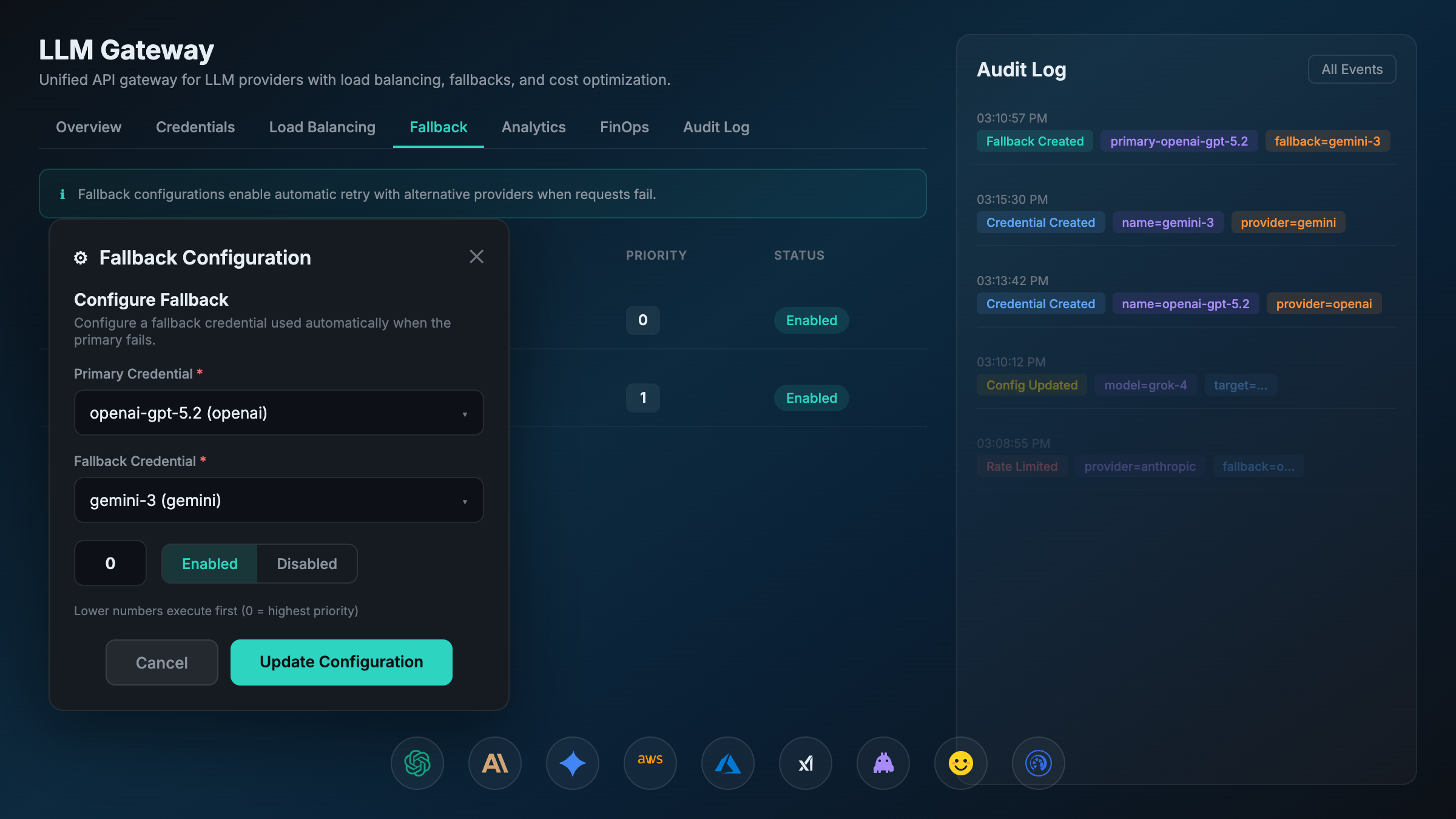
Overview
VibeFlow CLI (vibeflow-cli) is a session orchestrator for AI-powered development agents. It manages tmux sessions, git worktrees, and provider lifecycles — launching agents like Claude Code, OpenAI Codex CLI, and Google Gemini CLI against your codebase. By default, each provider connects directly to its respective LLM API. However, routing requests through an LLM Gateway unlocks centralized credential management, load balancing, cost tracking, and provider fallback — without changing how agents are launched or configured.
This document covers two gateway options:
| Gateway | Type | Best For |
|---|---|---|
| LiteLLM | Open-source proxy | Teams wanting a lightweight, self-hosted OpenAI-compatible proxy across 100+ providers |
| Axiom LLM Gateway | Enterprise platform | Organizations needing encrypted credential storage, weighted load balancing, FinOps billing, and audit logging |
Architecture: Direct vs Gateway
Without a Gateway (Direct)
Each AI agent connects directly to its LLM provider. Credentials are scattered across environment variables, config files, and CI secrets.
flowchart LR
    subgraph vibeflow-cli
        A[Launch Command]
    end

    subgraph Agents
        C1[Claude Code<br/>Session 1]
        C2[Codex CLI<br/>Session 2]
        C3[Gemini CLI<br/>Session 3]
    end

    subgraph Providers
        P1[Anthropic API<br/>api.anthropic.com]
        P2[OpenAI API<br/>api.openai.com]
        P3[Google AI<br/>generativelanguage.googleapis.com]
    end

    A -->|tmux| C1
    A -->|tmux| C2
    A -->|tmux| C3

    C1 -->|ANTHROPIC_API_KEY| P1
    C2 -->|OPENAI_API_KEY| P2
    C3 -->|GEMINI_API_KEY| P3

    style P1 fill:#d4a574,stroke:#333
    style P2 fill:#74b9d4,stroke:#333
    style P3 fill:#74d4a5,stroke:#333
Problems with direct access:
- API keys stored in plaintext env vars on every developer machine
- No centralized cost tracking — each key accumulates spend independently
- No fallback if a provider has an outage
- No load balancing across multiple API keys or accounts
- Credential rotation requires updating every developer’s environment
With a Gateway
All agents route through a single gateway endpoint. The gateway handles authentication, credential resolution, load balancing, and provider routing.
flowchart LR
    subgraph vibeflow-cli
        A[Launch Command]
    end

    subgraph Agents
        C1[Claude Code<br/>Session 1]
        C2[Codex CLI<br/>Session 2]
        C3[Gemini CLI<br/>Session 3]
    end

    subgraph Gateway["LLM Gateway"]
        direction TB
        GW[Request Router]
        LB[Load Balancer]
        FB[Fallback Engine]
        CS[Credential Store<br/>Encrypted]
        AN[Analytics &<br/>FinOps]

        GW --> LB
        LB --> FB
        FB --> CS
        GW --> AN
    end

    subgraph Providers
        P1[Anthropic API]
        P2[OpenAI API]
        P3[Google AI]
        P4[Azure OpenAI]
        P5[AWS Bedrock]
    end

    A -->|tmux| C1
    A -->|tmux| C2
    A -->|tmux| C3

    C1 -->|Gateway Token| GW
    C2 -->|Gateway Token| GW
    C3 -->|Gateway Token| GW

    CS -->|Decrypted Key| P1
    CS -->|Decrypted Key| P2
    CS -->|Decrypted Key| P3
    CS -->|Decrypted Key| P4
    CS -->|Decrypted Key| P5

    style Gateway fill:#1a1a2e,stroke:#00d2be,color:#e2e8f0
    style GW fill:#0f3460,stroke:#00d2be,color:#e2e8f0
    style CS fill:#0f3460,stroke:#8b5cf6,color:#e2e8f0
Benefits Analysis
Credential Security
| Aspect | Direct | LiteLLM | Axiom Gateway |
|---|---|---|---|
| Key storage | Plaintext env vars | Plaintext config/env | AES-encrypted in database |
| Key exposure | Every developer machine | Proxy server only | Gateway server only |
| Key rotation | Manual, per-machine | Update proxy config, restart | API call, zero downtime |
| Audit trail | None | Request logs | Full audit log with user attribution |
Cost Control & Visibility
| Aspect | Direct | LiteLLM | Axiom Gateway |
|---|---|---|---|
| Spend tracking | Per-key, manual | Virtual key budgets | Per-provider, per-model, per-user analytics |
| Budget limits | None | Soft limits via callbacks | Hard limits with alerts (daily/weekly/monthly) |
| Cost attribution | By API key | By virtual key/team | By user, credential, provider, model |
| FinOps reporting | None | Basic spend tracking | Full FinOps dashboard with trend analysis |
Reliability & Performance
| Aspect | Direct | LiteLLM | Axiom Gateway |
|---|---|---|---|
| Failover | None — single point of failure | Fallback models via config | Automatic primary→fallback chains with retry |
| Load balancing | None | Round-robin across deployments | Weighted distribution across credentials |
| Retryable errors | Agent-level only | Configurable retries | Auto-detect (502/503/504, connection errors) |
| Caching | None | Redis-backed response cache | Redis + Ristretto in-memory cache |
Operational Flexibility
| Aspect | Direct | LiteLLM | Axiom Gateway |
|---|---|---|---|
| Add new provider | Update every agent config | Add to proxy config | Add credential via API |
| Multi-cloud | Manual per-agent | Unified API | Unified API + cloud-native auth (SigV4, OAuth) |
| Monitoring | None | Prometheus/Grafana optional | Built-in Prometheus metrics + Grafana dashboards |
Configuration: LiteLLM
1. Deploy LiteLLM Proxy
# Docker (recommended)
docker run -d \
  --name litellm \
  -p 4000:4000 \
  -e ANTHROPIC_API_KEY=sk-ant-... \
  -e OPENAI_API_KEY=sk-... \
  -v $(pwd)/litellm-config.yaml:/app/config.yaml \
  ghcr.io/berriai/litellm:main-latest \
  --config /app/config.yaml
2. LiteLLM Config (litellm-config.yaml)
model_list:
  - model_name: claude-sonnet-4-20250514
    litellm_params:
      model: anthropic/claude-sonnet-4-20250514
      api_key: os.environ/ANTHROPIC_API_KEY

  - model_name: gpt-4o
    litellm_params:
      model: openai/gpt-4o
      api_key: os.environ/OPENAI_API_KEY

  - model_name: gemini-2.5-pro
    litellm_params:
      model: gemini/gemini-2.5-pro-preview-05-06
      api_key: os.environ/GEMINI_API_KEY

# Fallback configuration
router_settings:
  routing_strategy: simple-shuffle  # or least-busy, latency-based
  num_retries: 2
  retry_after: 5
  fallbacks:
    - claude-sonnet-4-20250514:
      - gpt-4o
      - gemini-2.5-pro

general_settings:
  master_key: sk-litellm-master-key  # Gateway auth key
3. Configure vibeflow-cli (~/.vibeflow-cli/config.yaml)
Point Claude Code at LiteLLM by overriding the Anthropic API base URL:
server_url: "http://localhost:7080"   # VibeFlow server
api_token: "your-vibeflow-token"
default_project: "my-project"
default_provider: "claude"

providers:
  claude:
    binary: "claude"
    launch_template: >-
      {{.Binary}}
      --project-dir {{.WorkDir}}
      {{if .SkipPermissions}}--dangerously-skip-permissions{{end}}
    vibeflow_integrated: true
    env:
      ANTHROPIC_BASE_URL: "http://localhost:4000/v1"
      ANTHROPIC_API_KEY: "sk-litellm-master-key"

  codex:
    binary: "codex"
    launch_template: >-
      {{.Binary}}
      --project-dir {{.WorkDir}}
    vibeflow_integrated: false
    env:
      OPENAI_BASE_URL: "http://localhost:4000/v1"
      OPENAI_API_KEY: "sk-litellm-master-key"
Key insight: LiteLLM speaks the OpenAI API format. For Claude Code, set ANTHROPIC_BASE_URL to the LiteLLM proxy. For Codex, set OPENAI_BASE_URL. Each agent thinks it’s talking to its native provider, but requests route through LiteLLM.
4. Launch a Session
# Claude Code through LiteLLM
vibeflow-cli launch --provider claude --branch feature/auth

# Codex through LiteLLM
vibeflow-cli launch --provider codex --branch feature/api
Configuration: Axiom LLM Gateway
1. Add Credentials via API
The Axiom LLM Gateway stores credentials encrypted in the database. Add them via the management API:
# Add Anthropic credential
curl -X POST http://localhost:7080/rest/v1/llm-gateway/credentials \
  -H "Cookie: session=<your-session>" \
  -H "Content-Type: application/json" \
  -d '{
    "provider": "anthropic",
    "name": "anthropic-primary",
    "api_key": "sk-ant-api03-...",
    "default_model": "claude-sonnet-4-20250514",
    "weight": 0.7,
    "enabled": true
  }'

# Add OpenAI credential
curl -X POST http://localhost:7080/rest/v1/llm-gateway/credentials \
  -H "Cookie: session=<your-session>" \
  -H "Content-Type: application/json" \
  -d '{
    "provider": "openai",
    "name": "openai-primary",
    "api_key": "sk-...",
    "default_model": "gpt-4o",
    "weight": 1.0,
    "enabled": true
  }'

# Add Azure OpenAI (alternative provider)
curl -X POST http://localhost:7080/rest/v1/llm-gateway/credentials \
  -H "Cookie: session=<your-session>" \
  -H "Content-Type: application/json" \
  -d '{
    "provider": "azure",
    "name": "azure-eastus",
    "api_key": "azure-key-...",
    "default_model": "gpt-4o",
    "weight": 0.3,
    "enabled": true,
    "azure_config": {
      "resource_name": "my-openai-resource",
      "deployment_name": "gpt-4o-deployment",
      "api_version": "2024-12-01-preview"
    }
  }'
2. Configure Fallback Chains
# If Anthropic fails, fall back to OpenAI
curl -X POST http://localhost:7080/rest/v1/llm-gateway/fallback-configurations \
  -H "Cookie: session=<your-session>" \
  -H "Content-Type: application/json" \
  -d '{
    "primary_credential_id": 1,
    "fallback_credential_id": 2,
    "priority": 1,
    "enabled": true
  }'
3. Configure vibeflow-cli (~/.vibeflow-cli/config.yaml)
Point agents at the Axiom LLM Gateway’s OpenAI-compatible endpoint:
server_url: "http://localhost:7080"
api_token: "your-vibeflow-token"
default_project: "my-project"
default_provider: "claude"

providers:
  claude:
    binary: "claude"
    launch_template: >-
      {{.Binary}}
      --project-dir {{.WorkDir}}
      {{if .SkipPermissions}}--dangerously-skip-permissions{{end}}
    vibeflow_integrated: true
    env:
      # Route through Axiom LLM Gateway
      ANTHROPIC_BASE_URL: "http://localhost:7080/rest/v1/llm-gateway/v1"
      ANTHROPIC_API_KEY: "x-axiom-session"  # Gateway uses session auth

  codex:
    binary: "codex"
    launch_template: >-
      {{.Binary}}
      --project-dir {{.WorkDir}}
    vibeflow_integrated: false
    env:
      OPENAI_BASE_URL: "http://localhost:7080/rest/v1/llm-gateway/v1"
      OPENAI_API_KEY: "x-axiom-session"

  gemini:
    binary: "gemini"
    launch_template: >-
      {{.Binary}}
      --project-dir {{.WorkDir}}
    vibeflow_integrated: false
    env:
      GEMINI_API_BASE: "http://localhost:7080/rest/v1/llm-gateway/v1"
4. Set Budget Limits (Optional)
# Set monthly budget with alerts
curl -X PUT http://localhost:7080/rest/v1/llm-gateway/settings \
  -H "Cookie: session=<your-session>" \
  -H "Content-Type: application/json" \
  -d '{
    "budget_limit": 500.00,
    "budget_period": "monthly",
    "budget_alert_threshold": 0.8
  }'
5. Launch Sessions
# Claude through Axiom Gateway — all LLM requests routed centrally
vibeflow-cli launch --provider claude --branch main

# Launch in a worktree for isolation
vibeflow-cli launch --provider claude --branch feature/auth --worktree
Request Flow Comparison
Direct Provider Access
sequenceDiagram
    participant VC as vibeflow-cli
    participant CC as Claude Code
    participant API as Anthropic API

    VC->>CC: Launch tmux session<br/>(ANTHROPIC_API_KEY in env)
    CC->>API: POST /v1/messages<br/>Authorization: Bearer sk-ant-...
    API-->>CC: 200 OK (response)

    Note over CC,API: If API is down → agent fails
    Note over CC,API: If key rotates → update every machine
    Note over CC,API: No cost visibility
Through LLM Gateway
sequenceDiagram
    participant VC as vibeflow-cli
    participant CC as Claude Code
    participant GW as LLM Gateway
    participant P1 as Anthropic API
    participant P2 as OpenAI API (fallback)

    VC->>CC: Launch tmux session<br/>(ANTHROPIC_BASE_URL=gateway)
    CC->>GW: POST /v1/messages<br/>Authorization: Bearer gateway-token

    GW->>GW: Authenticate user<br/>Select credential (weighted)<br/>Decrypt API key

    GW->>P1: POST /v1/messages<br/>Authorization: Bearer sk-ant-...(decrypted)

    alt Provider Success
        P1-->>GW: 200 OK
        GW->>GW: Log usage, compute cost
        GW-->>CC: 200 OK (response)
    else Provider Error (502/503/504)
        P1-->>GW: 503 Service Unavailable
        GW->>GW: Detect retryable error<br/>Activate fallback chain
        GW->>P2: POST /v1/chat/completions<br/>(translated format)
        P2-->>GW: 200 OK
        GW->>GW: Log fallback usage
        GW-->>CC: 200 OK (response)
    end
Feature Comparison: LiteLLM vs Axiom LLM Gateway
| Feature | LiteLLM | Axiom LLM Gateway |
|---|---|---|
| Providers | 100+ via community plugins | 18 enterprise-grade providers |
| Deployment | Self-hosted Docker/pip | Integrated into Axiom platform |
| Credential storage | Config file / env vars | AES-encrypted database |
| Load balancing | Round-robin, least-busy, latency | Weighted distribution per credential |
| Fallback | Model-level fallback list | Credential-level primary→fallback chains |
| Cost tracking | Virtual key budgets | Full FinOps: per-user, per-model, trends |
| Auth to gateway | Master key / virtual keys | Session cookie / API key |
| Audit logging | Request/response logs | User-attributed audit trail |
| Cloud providers | Azure, Bedrock, Vertex via config | Native auth (SigV4, OAuth, Azure headers) |
| Caching | Redis response cache | Redis + Ristretto in-memory |
| Monitoring | Optional Prometheus | Built-in Prometheus + Grafana dashboard |
| Billing | Spend tracking per virtual key | Per-provider billing calculators with budget alerts |
| Open source | Yes (Apache 2.0) | Proprietary |
| Setup complexity | Low (single Docker container) | Integrated (part of Axiom deployment) |
vibeflow-cli Provider Configuration Reference
The providers map in ~/.vibeflow-cli/config.yaml controls how agents are launched. Each provider entry supports:
providers:
  <name>:
    binary: "<executable>"           # Binary name (must be on PATH)
    launch_template: "<go-template>" # Command template with variables
    prompt_template: "<template>"    # Optional: prompt passed to agent
    vibeflow_integrated: true/false  # Supports vibeflow MCP session protocol
    session_file: ".vibeflow-session"# Session file for integrated agents
    default: true                    # Mark as default provider
    env:                             # Environment variables for the agent
      KEY: "value"
Template variables available in launch_template:
{{.Binary}}— Provider binary name{{.WorkDir}}— Working directory (project root or worktree){{.SkipPermissions}}— Boolean, from--skip-permissionsflag
Built-in providers (registered by default):
| Provider | Binary | VibeFlow Integrated |
|---|---|---|
claude |
claude |
Yes |
codex |
codex |
No |
gemini |
gemini |
No |
Best Practices
1. Start with a Gateway Early
Even with a single provider, routing through a gateway from day one means:
- Zero-downtime credential rotation when keys expire
- Cost visibility from the first API call
- Easy addition of new providers or fallbacks later
2. Use Weighted Load Balancing for Cost Optimization
Distribute load across credentials to stay under rate limits and optimize costs:
Anthropic Key A (weight: 0.6) — primary account, higher rate limits
Anthropic Key B (weight: 0.4) — secondary account
3. Configure Fallback Chains for Reliability
For production development sessions, set up cross-provider fallbacks:
Primary: Anthropic Claude → Fallback 1: Azure OpenAI GPT-4o → Fallback 2: AWS Bedrock ClaudeThis ensures agent sessions survive provider outages.
4. Set Budget Alerts
Configure budget thresholds to prevent runaway spend during long autonomous sessions:
# Alert at 80% of $500/month budget
budget_limit: 500.00
budget_period: monthly
budget_alert_threshold: 0.8
5. Use Worktrees for Parallel Agent Sessions
Combine gateway routing with git worktrees for maximum parallelism:
# Each session gets isolated code + shared gateway
vibeflow-cli launch --provider claude --branch feature/auth --worktree
vibeflow-cli launch --provider claude --branch feature/api --worktree
vibeflow-cli launch --provider codex --branch feature/ui --worktree
All three sessions route through the same gateway, sharing credentials, load balancing, and cost tracking.
Summary
LLM Gateways transform vibeflow-cli from a session launcher into a centrally managed AI development platform. Whether you choose LiteLLM for its simplicity and breadth or Axiom LLM Gateway for its enterprise features, the integration pattern is the same: override the provider’s base URL in the vibeflow-cli config to point at your gateway, and let the gateway handle credentials, routing, and observability.
flowchart TB
    subgraph "Without Gateway"
        direction LR
        D1[Agent 1] -->|Key A| P1[Provider 1]
        D2[Agent 2] -->|Key B| P2[Provider 2]
        D3[Agent 3] -->|Key C| P3[Provider 3]
    end

    subgraph "With Gateway"
        direction LR
        G1[Agent 1] --> GW[Gateway]
        G2[Agent 2] --> GW
        G3[Agent 3] --> GW
        GW -->|Encrypted Keys| GP1[Provider 1]
        GW -->|Load Balanced| GP2[Provider 2]
        GW -->|Fallback Ready| GP3[Provider 3]
    end

    style GW fill:#0f3460,stroke:#00d2be,color:#e2e8f0
Choose LiteLLM when you need broad provider coverage, open-source flexibility, and quick self-hosted setup.
Choose Axiom LLM Gateway when you need encrypted credential management, weighted load balancing, enterprise FinOps, and integrated audit logging.
Either way, your vibeflow-cli agents get transparent routing, failover, and cost control — with no changes to how agents are launched or how they interact with LLM APIs.
Frequently Asked Questions
Why is this important for enterprises? Enterprises face unique challenges with AI adoption including regulatory compliance, data security, shadow AI proliferation, and the need to demonstrate ROI. Proper AI governance addresses all these concerns.
What are the security implications? AI systems can introduce security risks including data leakage, unauthorized access, and potential misuse. Proper governance ensures security controls are in place across all AI deployments.
How can I learn more about implementing this? Get started with AXIOM for free to see how our platform can help your organization implement enterprise-grade AI governance with complete visibility, control, and compliance.
Written by
AXIOM Team