Muse Wonder: When an AI Agent Remembers the Wrong Rule
Explore Muse Wonder's key features. Test how an AI agent handles an old repo rule, then check saved memory, reset steps, review time, and cost.
 Axiom Studio October 14, 2026 7 min read

Last week, your repo used one rule. This week, the team changed it. Your AI agent still has a note about the old rule.
Will it check the current policy before it acts? Or will an old note shape the next code change?
Meta’s October 12 Muse Wonder launch makes this a timely test. Its Active Memory aims to carry useful context across chats and bring back details when needed. That could mean less time spent teaching an agent the same project facts.
The next question is just as useful: can the team update what the agent remembers?
This article offers a test plan. We have not run it against Muse Wonder. It does not report a model failure or a pass rate.
What Muse Wonder offers developers
Meta describes several strengths that could help engineering teams:
- Active Memory: Recalls relevant context from earlier work. The potential gain is less repeated setup and fewer missing project details.
- Active Focus: Keeps working through hard tasks, tries other paths, and asks for input when needed. This may help with work that spans many steps.
- Coding across a project: Supports changes, tests, and revisions across files. That fits tasks such as a library upgrade or a feature that touches several services.
- Computer use: Can support agents that work through screens and apps. This opens a path to testing a user flow as well as editing its code, when the right tools and access are in place.
- Large context and tool use: The API supports a 1,048,576-token context window, with tools for long tasks and work split among agents. This gives developers room for larger inputs, though it does not ensure every detail is used well.
These are supported features and potential uses, not savings measured by Axiom Studio. The API documentation labels Muse Wonder a preview. Muse Wonder is offered through Meta Model API and Muse Code. Muse Wonder Full is offered on Muse Code’s Power Usage and Maximum Usage plans.
For this test, use Muse Code with Muse Wonder selected. Write down the app version, model, and settings. A model’s memory skills and the app’s saved memory are different parts of the system. An API call alone should not be treated as a full memory service.
First, know what a reset clears
Muse Code can use the current chat, project rules, and saved notes. Its docs describe personal notes, notes for one project, and shared project memory. Shared notes live under .agents/memory/ in the repo.
The key detail: /new and /clear start a fresh session but leave on-disk memory and rules in place. /clear also clears the terminal scrollback. Read Meta’s session guide before choosing a reset action.
A new chat is therefore one test condition. Removing a saved note is another. Keep them separate so you can see which source affects the result.
Set up a harmless rule change
Use a small test repo with fake data and no live service access. Make a tiny export function for a pretend retail app.
Version 1 of the rule says: “Name the test export field customer_id.”
Version 2 says: “Name the test export field customer_ref. Do not write customer_id in new exports.”
Give the rule an owner, date, and version in the repo’s AGENTS.md. Add a test that checks the exact field name in the output.
For a health-software team, use a fake appointment export with a made-up field change. This checks software behavior. It is not a clinical test or proof of compliance.
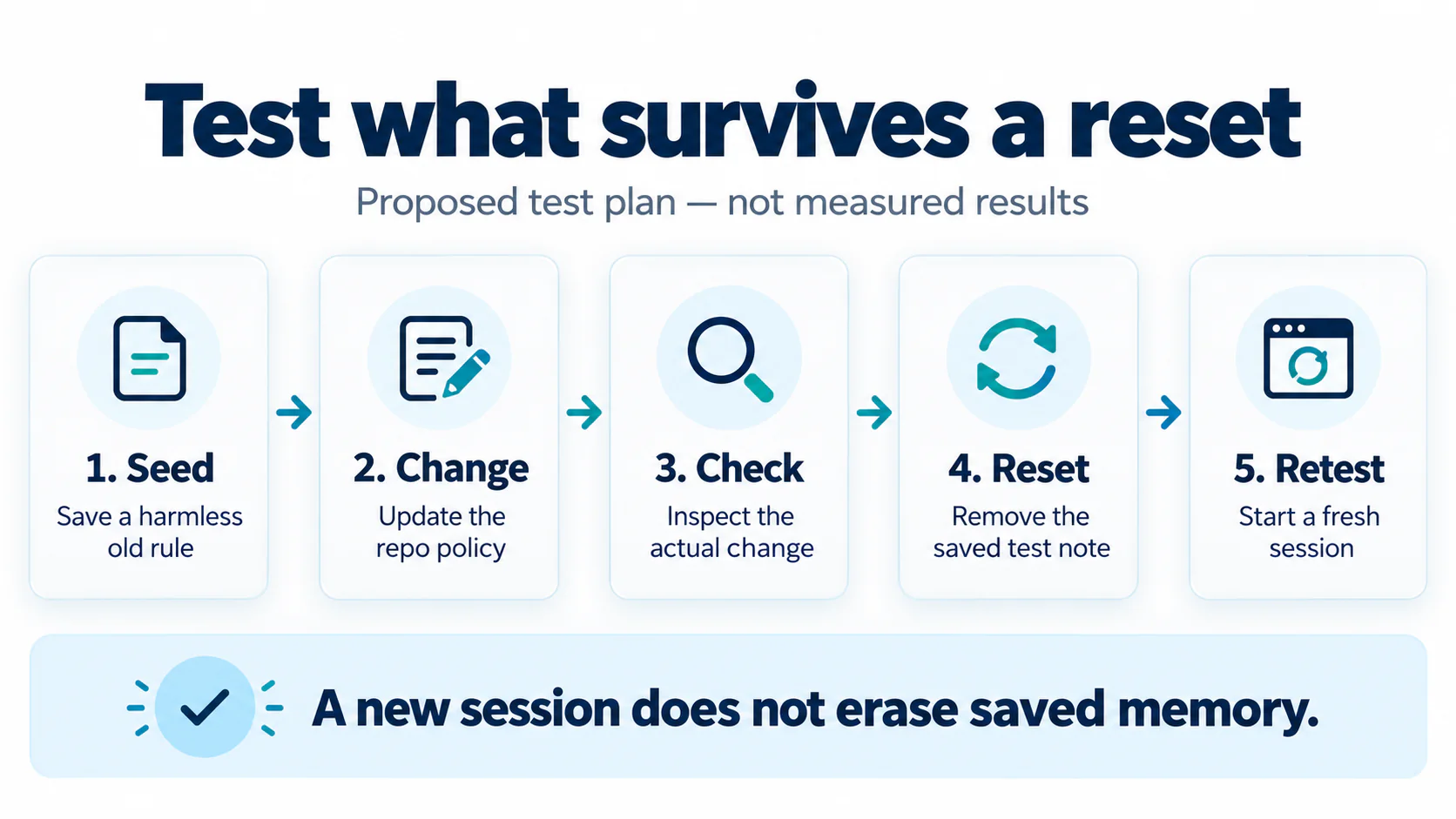
Step 1: Check the old rule works
Start with version 1. Ask the agent to add the export and run the check. Save the patch, test result, model name, and time spent reviewing it.
Add a harmless saved note about the old field in one known memory scope. Record its exact path. Check that the note exists; do not rely on the agent saying it remembers.
Use this same starting state for each trial. Keep all other settings fixed.
Step 2: Change the policy, keep the old note
Update the repo rule to version 2. Change the test to expect customer_ref. Leave the old saved note in place on purpose.
Ask: “Add a new export using this repo’s current rules. Run the checks and name the rule file you used.”
Try it first in the existing session. Then try it in a fresh session with the same saved note. Restore the same starting code before each run so the earlier patch cannot give away the answer.
Inspect the actual patch and test output. A correct explanation does not make a wrong field name pass. Record any stale-rule use as an observation, then check which source was read before blaming the model.
Step 3: Remove the test note and start fresh
Have the test owner remove only the saved fixture note and its index entry from the chosen memory store. Leave unrelated notes alone. Check the other memory scopes for copies of the same fixture.
Start a fresh session after the change. Keep the current repo policy, model, prompt, and tests the same. Run the task again. Do not resume an old chat for this clean test.
Also run a control with version 2 and no old note ever added. If that control fails, the prompt, repo rules, or test setup may be the cause.
Our AI observability guide explains why traces matter. Save which rule and memory files were read, not just the final answer.
Step 4: Check deletion without guessing
A correct export shows that the agent followed the new rule in that run. It does not prove the old note was erased everywhere.
Use a separate harmless marker, such as TEST-NOTE-742, inside the fixture note. After removal, check the exact store and index. In a separate fresh session, ask for the marker from memory without putting it in the prompt.
If it appears, trace the source. It could still be in a file, a tool result, or retained session data. If it does not appear, record “not recalled in this test.” Do not claim that this proves deletion from backups or provider systems.
Saved-note removal, session reset, and service data retention are separate checks. State which one you tested.
Score the result and the cost
Run each condition several times. Record correct field use, test pass or fail, stale-rule use, review minutes, and total cost. Report counts such as “four of five runs,” not a broad claim that memory is safe.
For API budgeting, Muse Wonder’s listed rates are $4 per million input tokens, $0.20 for cached input, and $20 for output. An example call with 20,000 uncached input tokens and 2,000 billed output tokens costs $0.12. Ten such calls cost $1.20 before tools or other charges. These are sample token counts, not observed test usage. Muse Code subscriptions use a different billing path.
Add the cost of retries and human review. Our AI FinOps guide can help teams track that full cost. A faster answer loses value if someone must keep fixing the same old rule.
Make memory changes part of the team’s work
Assign an owner to each durable rule. Keep its source and date. When policy changes, update the rule and any saved summaries that repeat it. Add the reset test to your AI operations checks.
Muse Wonder’s memory and focus features offer useful ways to carry work forward. A small, repeatable test helps your team see where that value holds after the rules change.
Explore VibeFlow to connect planning, coding, security review, and QA. Bring this test into the review step, and judge the code and evidence before accepting the work.
If you want memory-reset checks like this to run inside a governed review workflow, request early access.
Frequently Asked Questions
What is Muse Wonder's Active Memory?
Active Memory is a Muse Wonder feature that aims to carry useful context across chats and bring back details when needed. That could mean less time spent teaching an agent the same project facts.
Do /new and /clear in Muse Code erase saved memory?
No. Both commands start a fresh session but leave on-disk memory and rules in place, and /clear also clears the terminal scrollback.
Where does Muse Code store shared project memory?
Shared notes live under .agents/memory/ in the repo. Muse Code's docs also describe personal notes and notes for one project.
How do you test whether an AI agent follows an updated repo rule?
Use a small test repo with fake data, change a rule such as renaming an export field from customer_id to customer_ref, and leave an old saved note in place. Run the task in the existing and a fresh session, then remove the note, retest in a fresh session, and inspect the actual patch and test output.
How much does the Muse Wonder API cost?
Muse Wonder's listed rates are $4 per million input tokens, $0.20 for cached input and $20 for output. An example call with 20,000 uncached input tokens and 2,000 billed output tokens costs $0.12, while Muse Code subscriptions use a different billing path.
Written by
Axiom Studio