Axiomstudio Launches OpenSeal as an Open-Source AI Agent Platform
OpenSeal helps developers save agent progress, manage projects, and review actions through a single Go core.
Axiomstudio has released OpenSeal, an open-source AI agent platform for developers building agents and teams. The source code is available on GitHub under the Apache License 2.0. Developers can inspect the code, run it locally, and adapt it for their own applications under the license.
OpenSeal brings task records, approval steps, and project controls into one core. Teams can use these shared components instead of building a new way to save progress and handle reviews for every agent.
One core for agent work
A model response is one step in a larger task. The application still needs to know what the task is, which work is done, and why the next step is waiting. OpenSeal stores those records so work can last longer than one running process.
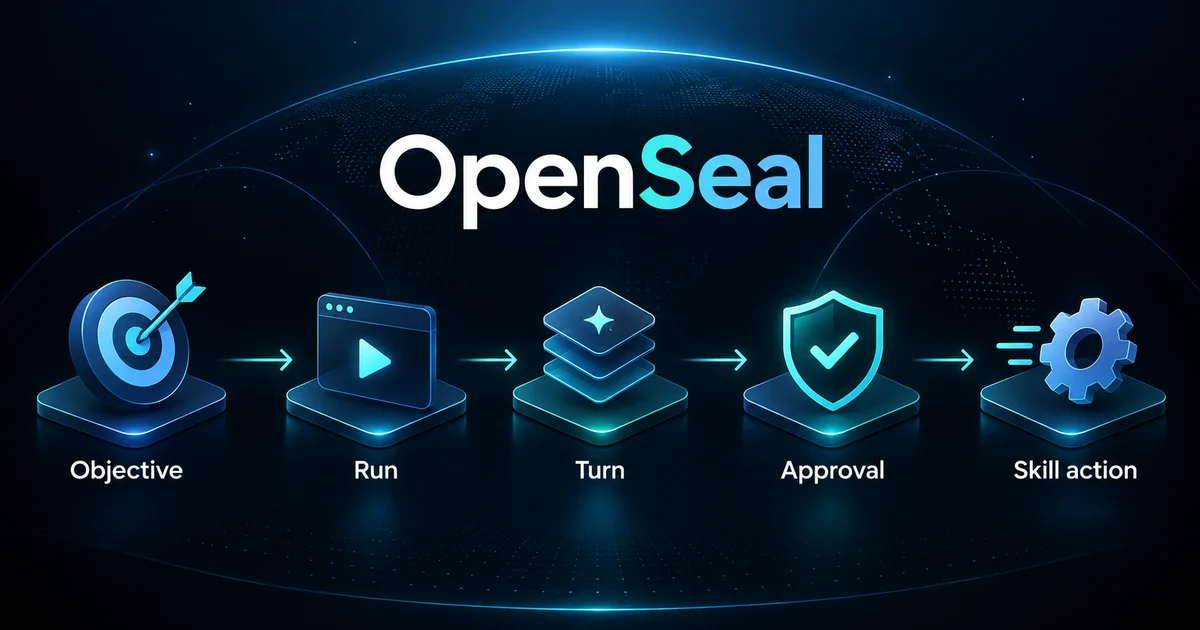
An Agent or Team owns an Objective, which describes the result it should reach. A Run tracks work toward that result. Each Run moves through short steps called Turns. A Turn may use a Skill to take an action.
Workers claim Turns for a limited time. If a worker stops, its claim can expire and the work can become available again. Pending approvals are saved too, so a service restart does not erase the wait for a decision.
The platform ships as one Go binary with a background service, an HTTP API, and a terminal client. The local service uses SQLite. Developers can also use the core as a Go library inside a host application, including one that uses PostgreSQL.
Access to multiple LLMs through a gateway
OpenSeal supports an OpenAI-compatible endpoint for workforce authoring. This feature turns a prompt into a proposed set of agents, teams, and Skills. Developers review and apply the proposal in separate steps.
That endpoint can connect to a compatible LLM gateway, giving the application access to multiple large language models through one model-access layer. This keeps provider connections separate from the task records and review steps in OpenSeal.
The documented setup selects one authoring model. Model routing and fallback depend on the gateway a team connects and configures; they are not automatic promises of the OpenSeal core.
Approval rules built into the work
A Skill defines an action an agent can take. Adding it to the catalog does not give every agent the right to use it. A binding grants that Skill to a specific Agent or Team deployment.
When policy requires review, the action pauses at a saved approval checkpoint. OpenSeal also saves activity events with the state changes they describe. These records help teams inspect what changed and track the decisions behind the work.
These features support governance and compliance work. Each deployment still needs its own access controls. The standalone API does not include login, request authorization, or TLS; the host or a proxy must supply them. A team that needs to identify each human reviewer also needs an authenticated host.
Project management alongside agent tasks
Projects group related objectives and connect them to source monitoring and outreach that follows approval rules. Run states show whether work is waiting for a person, another agent, a dependency, or an event.
Teams can pause, resume, cancel, or intervene in a Run. This puts project controls next to the work they affect. For example, a team could group release-note tasks in a project, watch relevant sources, and hold a sending action for review. The team would connect the Skills and host controls needed for that workflow.
Find OpenSeal on GitHub
OpenSeal is available in the axiom-studio/openseal repository. Start with its README for setup and build steps, review the Apache License 2.0 terms, and use GitHub Issues to report a problem or discuss a proposed change.
Read the OpenSeal documentation.
For a first test, run one small local task. Check the service capabilities, follow its Run state, and try an action that needs review. Restart while approval is pending, then check the saved record and any effects outside the application. This gives you a clear view of how OpenSeal fits your project.